
Parse the 'git log' of one or several 'git' repositories into a sanitised and distributable 'JSON' file.
Why?
git log is a wonderful tool. However its output can be not only surprisingly inconsistent, but also long, difficult to scan and to distribute.
Gitlogg sanitises the git log and outputs it to JSON, a format that can easily be consumed by other applications. As long as the repositories being scanned are kept up to date, Gitlogg will return fresh data every time it runs.
Gitlogg addresses the following challenges:
git logcan only be used on a repository at a time.git logcan't be easily consumed by other applications in its original format.git logdoesn't return impact, which is the cumulative change brought by a single commit. Very interesting graphs can be built with that data, as shown on sidhree.com.- Fields that allow user input, like
subject, need to be sanitised to be consumed. - File changes shown under
--stator--shortstatare currently not available as placeholders under--pretty=format:<string>, and it is cumbersome to get commit logs to output neatly in single lines - with stats. - It is hard to retrieve commits made on a specific but generic moment, like "11pm"; at the "27th minute" of an hour; on a "Sunday"; on "March"; on "GMT -5"; on the "53rd second of a minute".
- Some commits don't have stats, and that can cause the structure of the output to break, making it harder to distribute it.
Script execution feedback
Gitlogg is not a very complex application, but I still made an effort to provide some feedback on what is happening under the hood. Below are some screenshots of dialogs one can expect to see while executing it:

Øh nøes! The path to the folder containing all repositories does not exist!

Øh nøes! The path to the folder containing all repositories exists, but is empty!
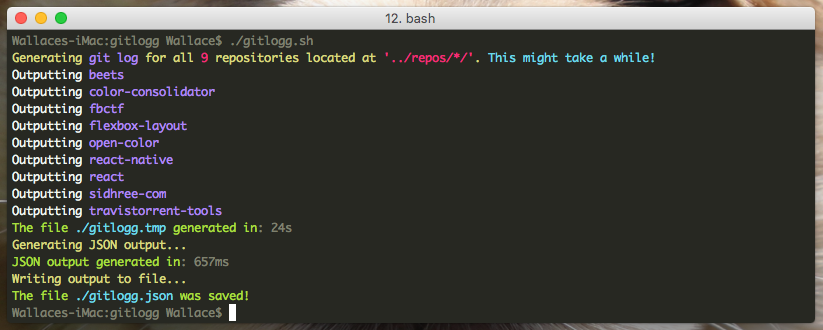
Success!
JSONparsed, based on 9 different repositories with a total of 25,537 commits.
Note that I've included two huge repos (react & react-native, that have 7,813 & 10,065 commits respectively at the time of this writting) for the sake of demonstration. The resulting parsed JSON file has 715,040 lines. All that done in less than 25 seconds.
I have successfully compiled 470 repositories at once (all repos under the organization I work for). Then I got these specs:
gitlogg.tmpgenerated in154s(~2.57mins)JSONoutput parsed in2792msJSONfile size:121,5MB- Commits processed:
118,117 - Parsed
JSONfile, lines:3,307,280
Getting started
Gitlogg requires NodeJS and BabelJS.
- Install
NodeJS(visit their page to find the right install for your system). - Run
npm run setup. That will:
- Install
BabelJSglobally by runningnpm install babel-cli -g. - Install all the local dependencies, through
npm install. - Create the directory in which all repos to be parsed to
JSONwill be at (only on Simple Mode). - Create the directories expected by the scripts that output files.
The JSON output
The output will look like this (first commit for Font Awesome):
{
  "commits": [
    {
      "repository": "Font-Awesome",
      "commit_nr": 1,
      "commit_hash": "7ed221e28df1745a20009329033ac690ef000575",
      "author_name": "Dave Gandy",
      "author_email": "dave@davegandy.com",
      "author_date": "Fri Feb 17 09:27:26 2012 -0500",
      "author_date_relative": "4 years, 3 months ago",
      "author_date_unix_timestamp": "1329488846",
      "author_date_iso_8601": "2012-02-17 09:27:26 -0500",
      "subject": "first commit",
      "subject_sanitized": "first-commit",
      "stats": " 1 file changed, 0 insertions(+), 0 deletions(-)",
      "time_hour": 9,
      "time_minutes": 27,
      "time_seconds": 26,
      "time_gmt": "-0500",
      "date_day_week": "Fri",
      "date_month_day": 17,
      "date_month_name": "Feb",
      "date_month_number": 2,
      "date_year": "2012",
      "date_iso_8601": "2012-02-17",
      "files_changed": 1,
      "insertions": 0,
      "deletions": 0,
      "impact": 0
    },
    {
      (...)
    },
Note that many git log fields were not printed here, but that's only because I've commented out some of them in the gitlogg-parse-json.js script. All the fields below are available. Fields marked with a * are either non-standard or not available as placeholders on --pretty=format:<string>:
* repository
* commit_nr
  commit_hash
  commit_hash_abbreviated
  tree_hash
  tree_hash_abbreviated
  parent_hashes
  parent_hashes_abbreviated
  author_name
  author_name_mailmap
  author_email
  author_email_mailmap
  author_date
  author_date_RFC2822
  author_date_relative
  author_date_unix_timestamp
  author_date_iso_8601
  author_date_iso_8601_strict
  committer_name
  committer_name_mailmap
  committer_email
  committer_email_mailmap
  committer_date
  committer_date_RFC2822
  committer_date_relative
  committer_date_unix_timestamp
  committer_date_iso_8601
  committer_date_iso_8601_strict
  ref_names
  ref_names_no_wrapping
  encoding
  subject
  subject_sanitized
  commit_notes
* stats
* time_hour
* time_minutes
* time_seconds
Creating the JSON file
There are two modes and they are basically the same, except that the Simple Mode doesn't require configuration. The Advanced Mode requires one to set the absolute path to the directory containing all the repositories you'd like to parse to a single JSON file.
Simple Mode
To simplify the generation process to a point that no configuration is required, follow this directory structure:
gitlogg/          <== This repository's root
├── scripts/
│   ├── gitlogg-generate-log.sh
│   ├── gitlogg-parse-json.js
│   └── gitlogg.sh
└── _repos/       <== Copy/place/keep your repositories under the folder "_repos/"
    ├── repo1
    ├── repo2
    ├── repo3
└── repo4-
Copy the all the repositories you wish to parse to
JSONto the_repos/folder, as shown above. -
Granted that you are within the
gitloggfolder (this repo's root), run:$ npm run gitlogg
Advanced Mode
To generate the JSON file based on repositories in any other location, you'll have to define the path to the folder that contains all your repositories.
-
Open
gitlogg-generate-log.shwith an editor of your choice and edit theyourpathvariable:# define the absolute path to the directory that contains all your repositories yourpath=/absolute/system/path/to/directory/that/contains/all/your/repositories/
Tip: drag the folder that contain your repositories to a terminal window, and you'll get the absolute system path to that folder.
-
Granted that you are within the
gitloggfolder (this repo's root), run:$ npm run gitlogg
The parsed JSON file
Two files will be generated when running
npm run gitlogg:_tmp/gitlogg.tmpand_output/gitlogg.json.
gitlogg/                <== This repository's root
├── scripts/
│   ├── gitlogg-generate-log.sh
│   ├── gitlogg-parse-json.js
│   └── gitlogg.sh
├── _output/
│   └── gitlogg.json    <== The parsed 'JSON', what we're all after. It's parsed from 'gitlogg.tmp'
└── _tmp/
└── gitlogg.tmp <== The processed 'git log'Two files were necessary because of the nature of the script, that loops through all subdirectories and outputs the git log for all valid git repositories. Once that loop is done, a valid JSON file (gitlogg.json) is generated out of gitlogg.tmp.
gitlogg.tmp is just a temporary file from which gitlogg.json bases itself on. In case the parsing fails gitlogg.tmp can come in handy for debugging.
Further Notes
Debugging
I've created error messages with suggested solutions, to help you get past the most common issues.
However, git log's output can break while it's being processed. That's most certainly caused by fields that allow user input, like commit messages. These fields may contain characters (like \r) that crash with those reserved for the generation of gitlogg.tmp, namely \n.
Efforts have been made to mitigate errors by sanitizing characters that have caused errors before, but it might still happen in some edge cases. If it does happen, have a look at the generated gitlogg.tmp and see if the expected structure (which is obvious) breaks. Once you have identified the line, have a closer look at the commit and look for an unusual character.
Post an issue with a link to a gist containing your broken gitlogg.tmp and I will try to reproduce the error.
Documentation
Documentation is done either by:
- Commit messages,
- Commit comments,
- Code comments,
README.mdfiles, like this one.
Some of the initial commits were done deliberately to show what one gets with short commands like $ git log. From that initial state commits keep on introducing simplicity or complexity to the code, depending on the work flow. That in itself is a form of documentation. In other words, if you're really that interested in details, there are plenty to be had in the code itself and in its own progressive enhancement.
License
Disclaimer
This project is by no means the smartest way to parse a git log to JSON, nor does it aim at becoming so. It is simply a learn-by-doing project in which I experiment with commands available on OSX's Terminal and whatever else I find along the way.
Gitlogg was built and tested on OSX. Though an effort has been done to make it cross-platform, there could be errors on other systems.
It's certainly not harmful to your repositories and it won't change any data in it. Having said that, it's served raw and 'as is'. You may get support, but don't expect it nor take it for granted.
Release History
- 2016-11-21 v0.1.7 - View Changes
- Better readability for 'Release History'
- Correct url to logo, so it also renders outside Github
- Rename sub-folder 'gitlogg' to 'scripts' to avoid confusion
- Simplify initial setup and running of 'gitlogg'
- Set vars instead of hardcoding values
- Separate scripts from output files
- Introduce 'Debugging' as a 'Further Notes' item
- Tip on how to get the absolute system path to a directory
- Introduce 'View Changes' links under 'Release History'
- 2016-11-19 v0.1.6 - View Changes
Brought to you by Wallace Sidhrée.