contents
📦 deps 


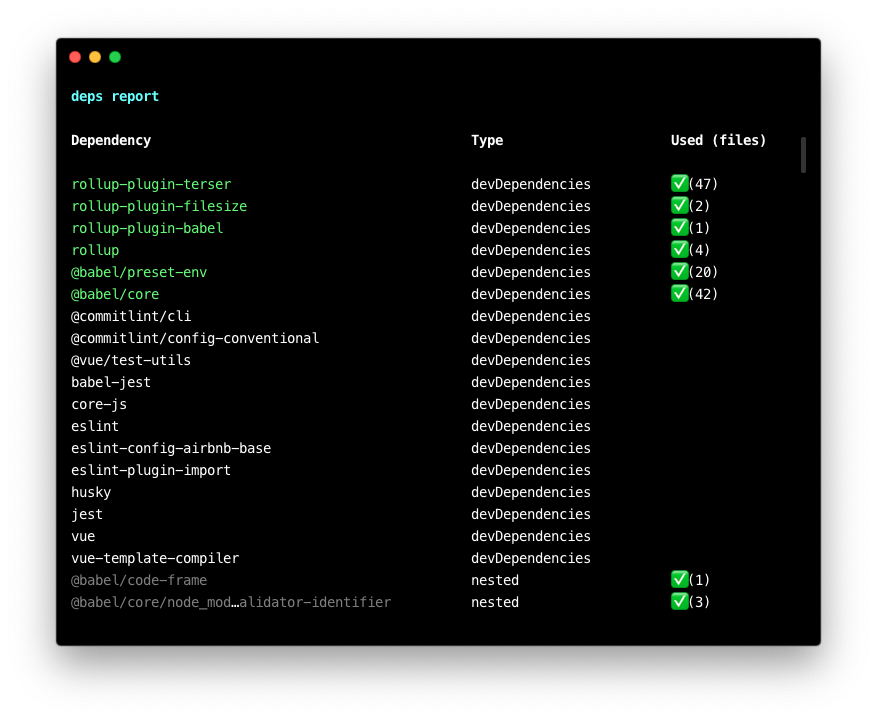
Accurately detect which Node dependencies are in-use with V8 Coverage 🔥
Try it out!
$ npx deps [...command]eg. npx deps npm run build
:rocket: Install
Install globally if you don't want to use it via npx.
npm i -g depsUsage
🔬 Quick analysis
Prefix your Node command with deps and it will analyze and output the dependencies it used
$ deps ...eg. deps npm run build
👩🔬 Analyzing dependency usage across commands
Prerequisite: install deps globally
- Start recording dependecy usage (note the dot-space at the beginning)
$ . deps-start- Run a series of Node scripts eg.
npm run devnpm run buildnpm run lint- etc.
- Analyze used dependencies
$ deps analyze- Save data to file:
deps analyze -o output.json - Read later with:
deps -f output.json
- When you're done, stop recording
$ . deps-stop💁♂️ FAQ
How does it work?
deps detects which modules are loaded by using V8's code coverage feature, so it's very accurate. However, it doesn't detect file-system reads, as they are simply read as text rather than actually being parsed and executed. That means it can't detect what files are statically analyzed by bundlers (eg. Webpack, Rollup, etc.). I am considering supporting FS reads in the future.
How does it compare to depcheck?
depcheck statically analyzes your project to see which dependencies are imported, avoiding the need to execute code. In contrast, deps executes code to analyze which dependencies were loaded during run-time. They work in completely different ways, but a major drawback for me is that depcheck requires a "special" for supporting whether a module was loaded via dev-tools.
💼 License
MIT