
Frizz
An opinionated agent console for extreme productivity.
by @colinhacks



Frizz is for you if you have any of these opinions:
- Terminal UIs are dated and have fundamental limitations that are incompatible with good user experience.
- Orchestrator-style apps like Conductor feel overly complex.
- It's annoying to constantly switch between sessions to check in on my agents' progress.
Getting started
Requirements. Node 22.13+, and one of these:
- A Claude Code or Codex subscription you are signed in to. Frizz drives the subscription you already pay for.
- OpenCode on your PATH. It needs no subscription, because OpenCode's free models work with no account.
Frizz brings its own pinned copy of Claude Code and Codex, downloaded once, so the version on your PATH is yours to manage and never changes what a thread runs. The download happens on first start, or at the first thread on each one if you have OpenCode and are signed in to neither.
Then run it, from anywhere.
$ npx frizz

  FRIZZ v0.13.17  ready in 4.0s

  ➜  Local:    http://127.0.0.1:9393/
  ➜  Logs:     ~/Library/Application Support/Frizz/projects/979dae3c-fe15-4038-817e-11d0e7491959/logs/frizz-2026-08-01T13-44-43-16931.log

press R to reach this board from a phone or another machine · ctrl-c to stopA browser tab opens on the dashboard at http://127.0.0.1:9393/. Add a project there — any folder: a repo, a jj checkout, or a folder of scripts. Frizz has no opinion about version control and does not require Git. Each project gets its own board at /project/<name>, and from then on running npx frizz inside that folder opens its board. Frizz always listens on port 9393 (19393 if something else holds it), and one server serves every project on the machine, so a second run joins the server already running rather than starting another. Runs on macOS, Linux, and Windows.
Features
Frizz is a browser tab, a queue, and the agent CLIs you already pay for. It brings no model of its own, automates none of your workflow, and keeps every opinion it does have in a text file you can edit.
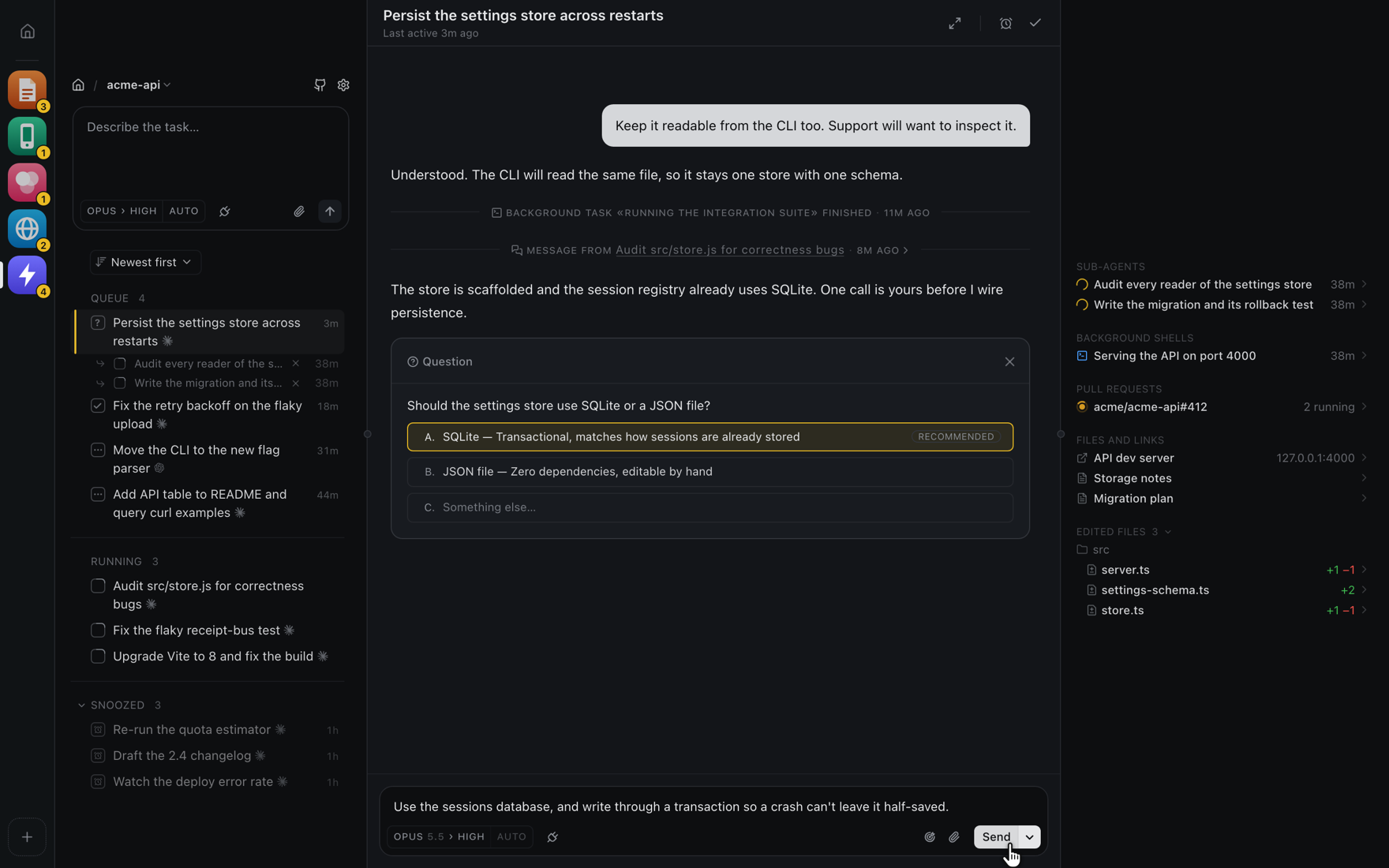
- 🗂️ A task queue, not a session list. Every agent that comes to rest needing you joins one queue, and the thread you open sits beside it. Work the queue top to bottom instead of polling ten terminals.
- 📁 Projects. Every folder you add gets its own board, all on one server. The home page lists them, and the project rail switches between them with each queue's count on its icon.
- 🔌 Headless. Every thread's agent runs in its own detached background process. Close the tab, quit the browser, ctrl-c the server, reboot — your threads are all still there when you come back, and Frizz reconnects to the ones still running rather than replaying them from disk.
- 🤖 Claude Code, Codex and OpenCode. Pick the agent per thread and run them against the same repo at once. Frizz supports Claude Code and Codex subscriptions — your sign-in, your settings, your skills, driven by a copy of each CLI that Frizz pins and provisions itself. OpenCode runs from your own install, and its free models need no account.
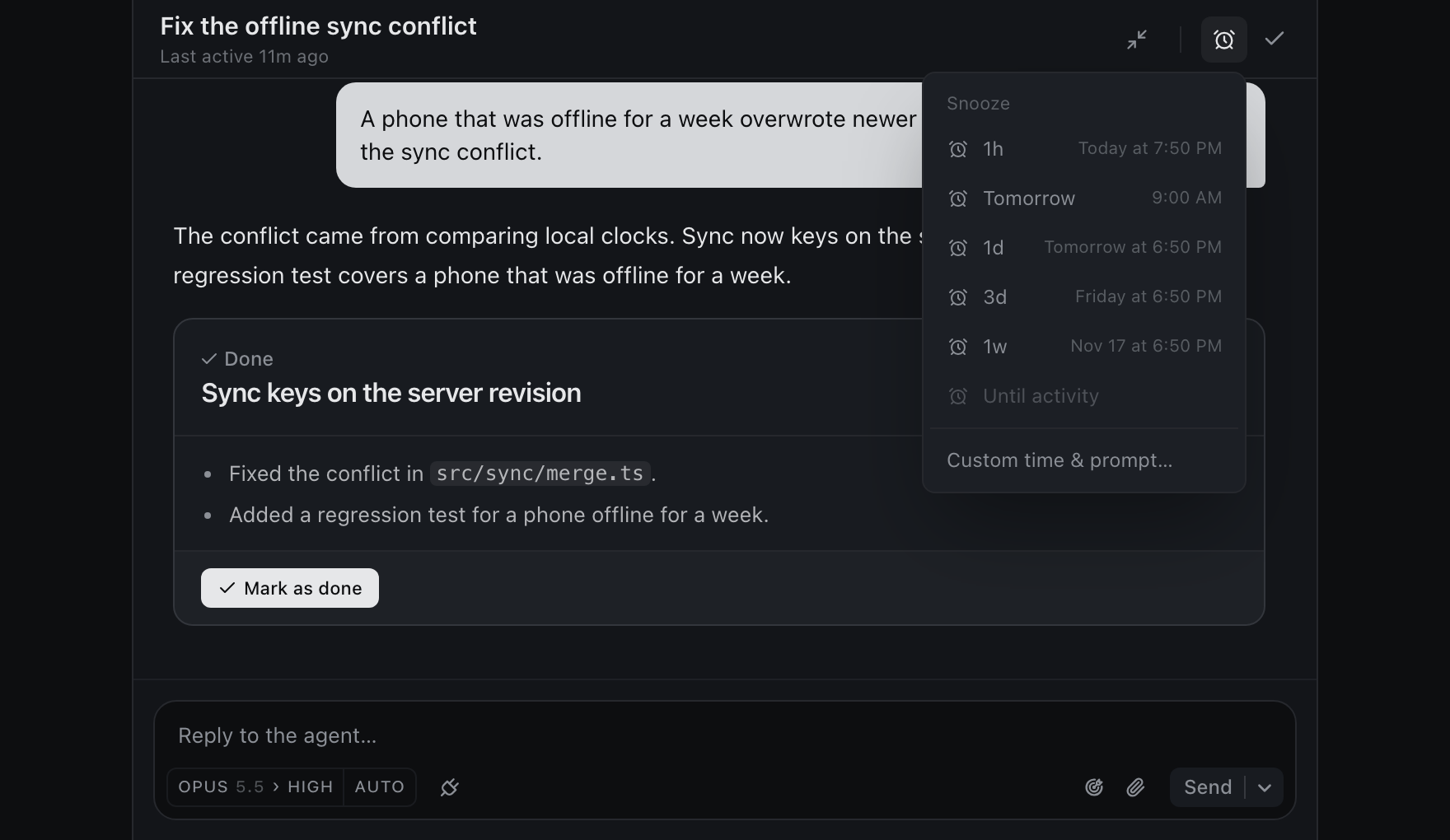
- 😴 Snooze. Not everything needs an answer now. Park a thread for an hour, until tomorrow morning, or until a date you pick — optionally with a follow-up prompt attached, so the thread wakes up already working on what you told it to do next.
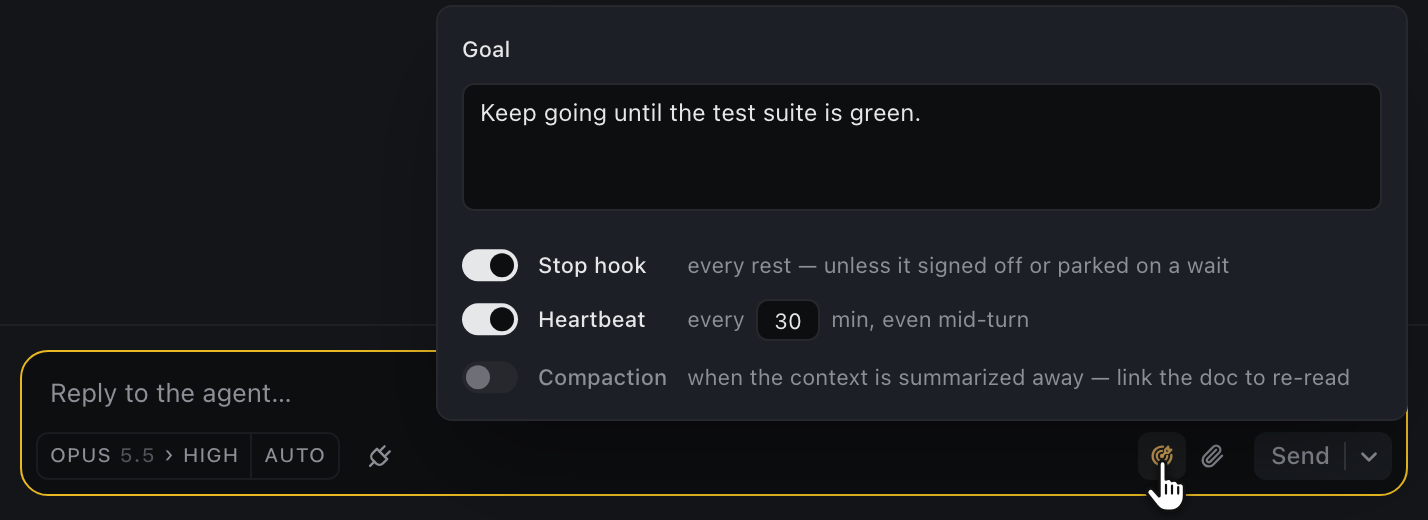
- 🎯 Goals. Give a thread a standing goal that Frizz re-sends as a prompt — every time it comes to rest, on a clock you set in minutes, or both. Good for "keep going until CI is green" without you re-asking. A scheduled one reaches the agent even mid-turn, so it can nudge a thread that never stops. Switch it off whenever, or let the agent say it's finished.
- 🐙 GitHub integration. Browse your repo's issues and pull requests without leaving the composer, and turn a selection of them into threads. Workers can read issues, diffs, and CI on their own.
- 👀 Built-in CI and PR watchers. A worker waiting on a build or a review doesn't hand the thread back to you to be told "keep going." It watches, and picks the work back up when the run goes green or a review lands.
- 📝 No magic. A thread behaves like a Claude Code session you started yourself. Frizz adds no worktrees, no branches, no dev server, no build integration, no workflow engine to fight with.
- 🔒 Local only. No cloud, no account, no telemetry. The server runs on localhost by default and its state lives in your user directory, never in your checkout. To reach a board from a phone, press R in its terminal — see Remote access.
Projects
Every folder you add becomes a project with its own board, all served by the one Frizz on your machine. The dashboard at http://127.0.0.1:9393/ lists them, and it is where npx frizz lands when it is run outside one.
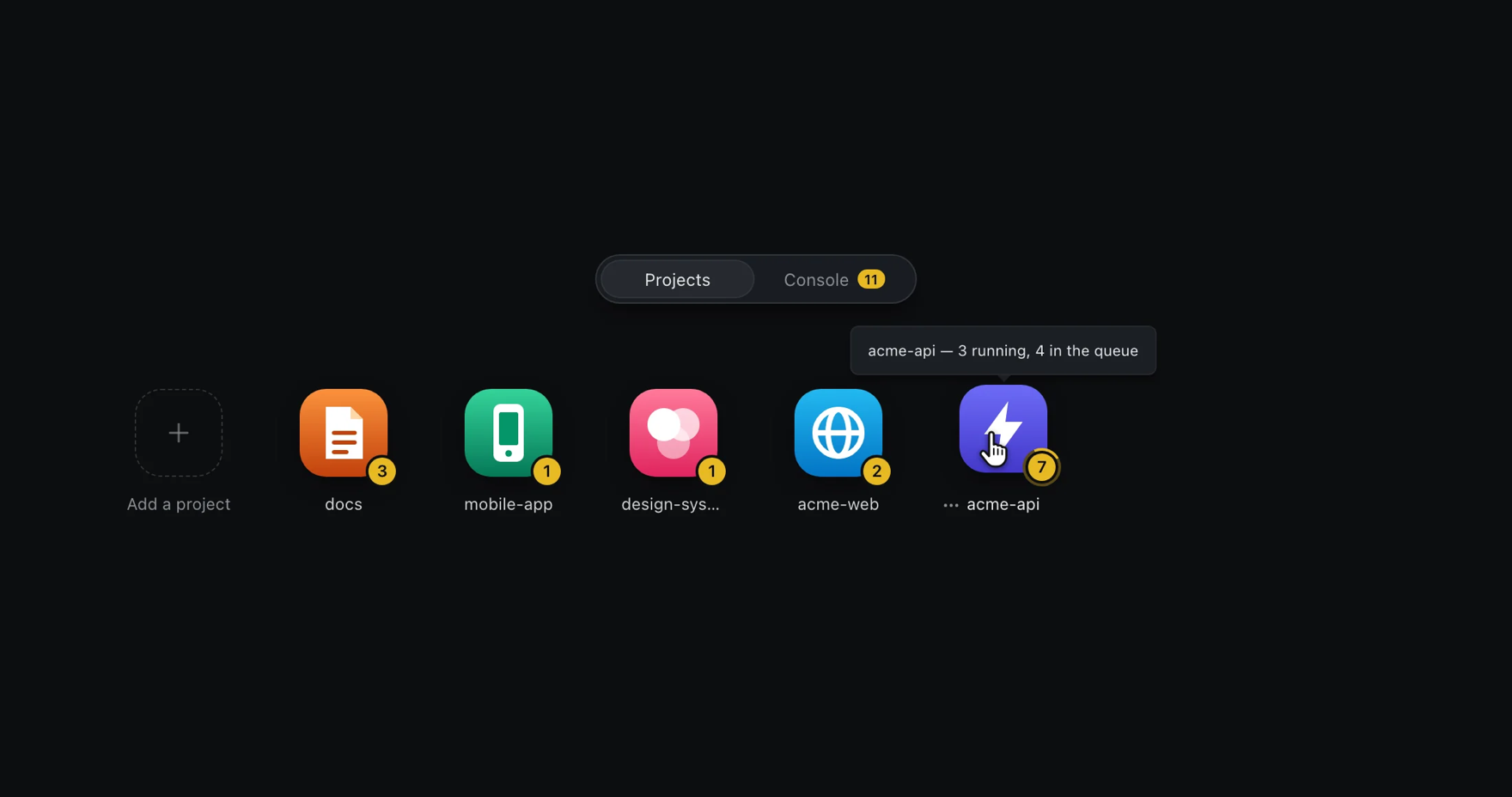
The project rail keeps every project one click away, with each queue's count on its icon. It is off by default; switch it on under Settings → Project sidebar.
The queue
A list of sessions makes every agent something you have to remember to go check. Frizz gives you one queue instead.
When an agent comes to rest needing you, its thread joins the queue. Open one and it takes the space beside the list, where you read what the agent has done since your last message and answer its questions, steer it, snooze it, or mark it done. Done and snooze bring up the next thread in the queue, and ⇧⌘⏎ sends a reply and moves on. You work through one set of action items in one place, instead of switching back and forth between sessions.
The queue is strict about what joins it, which is what keeps it a real todo list. A thread resting only because its own helpers are still working isn't waiting on you, so it stays quiet until they're back. Nothing shows up just to be dismissed.
Threads are built to run without you. A worker keeps going until it reaches something only you can settle — a product call, a fork where guessing wrong is expensive to undo, an irreversible action — and then it hands back an answerable question rather than a wall of text for you to re-read and interpret.
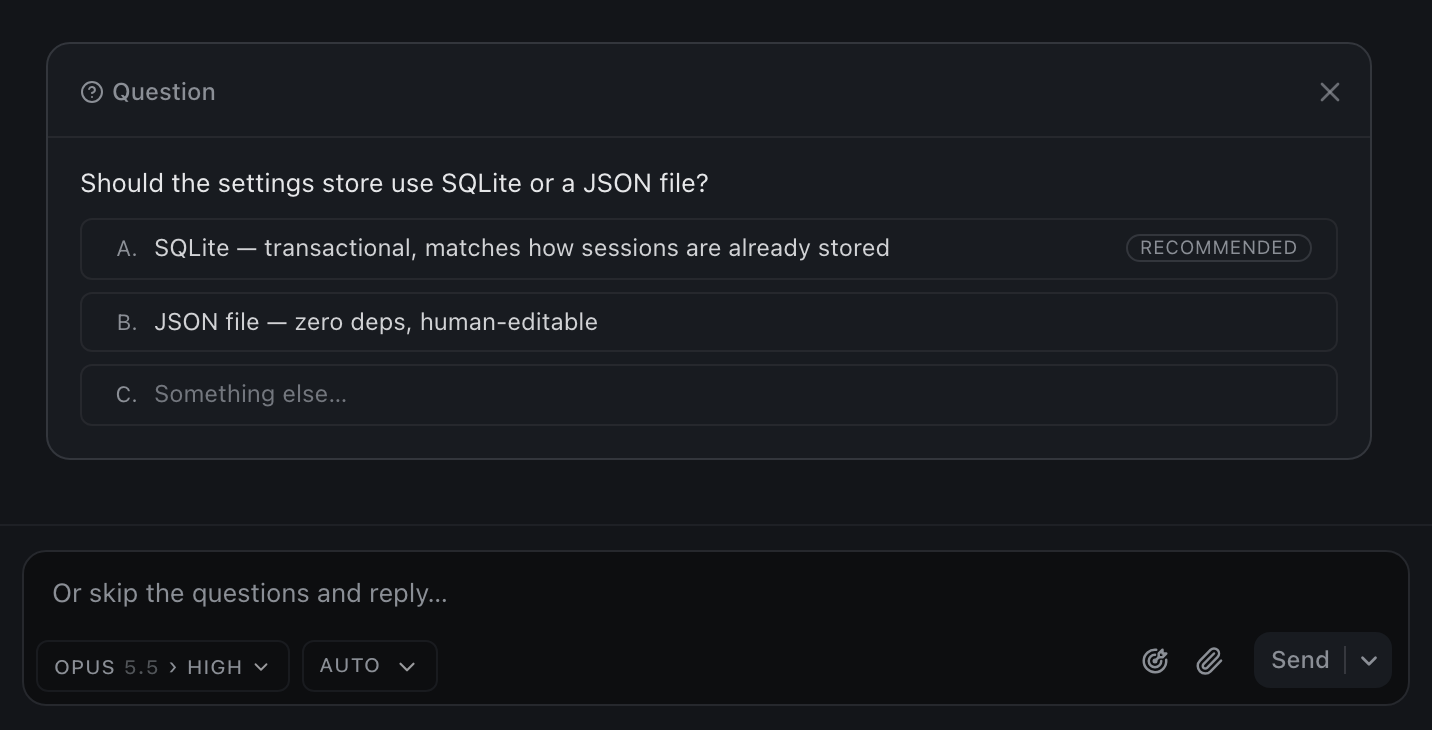
Options are lettered: click one to pick it, then Enter to send it, along with anything typed in the prompt box below. A worker marks its own recommendation when it has one. There is always a row for writing something else instead.
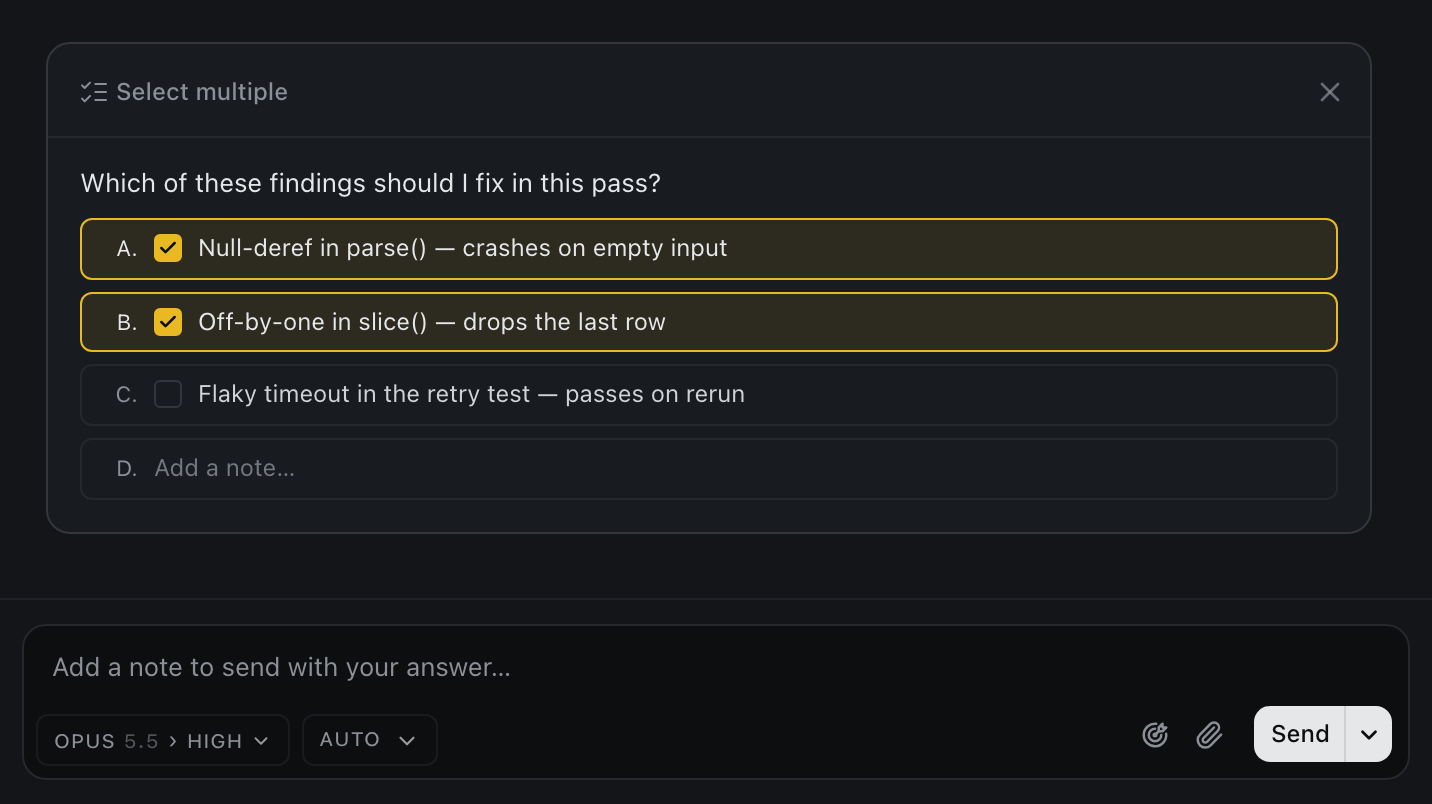
When the answer isn't one thing, the same card takes several: check any combination and add a note.
GitHub
Browse the repo's issues and pull requests from the composer, select any number of them, and each becomes its own thread.
Sign Frizz in once from Settings → GitHub, with a device code. The sign-in is read-only with one exception GitHub builds in: it can read code, issues, pull requests and checks on the accounts where you install the Frizz GitHub App, plus public repos, and the only thing it can do beyond reading is comment on a commit. It's what watches pull requests and issues for your workers, overnight included, and it's separate from any gh sign-in of your own. It's stored encrypted, with a key unique to your machine: in the keychain on a Mac, and in a separate private file elsewhere. That keeps it from token scanners and copied files, but not from a program running as you that goes after Frizz on purpose.
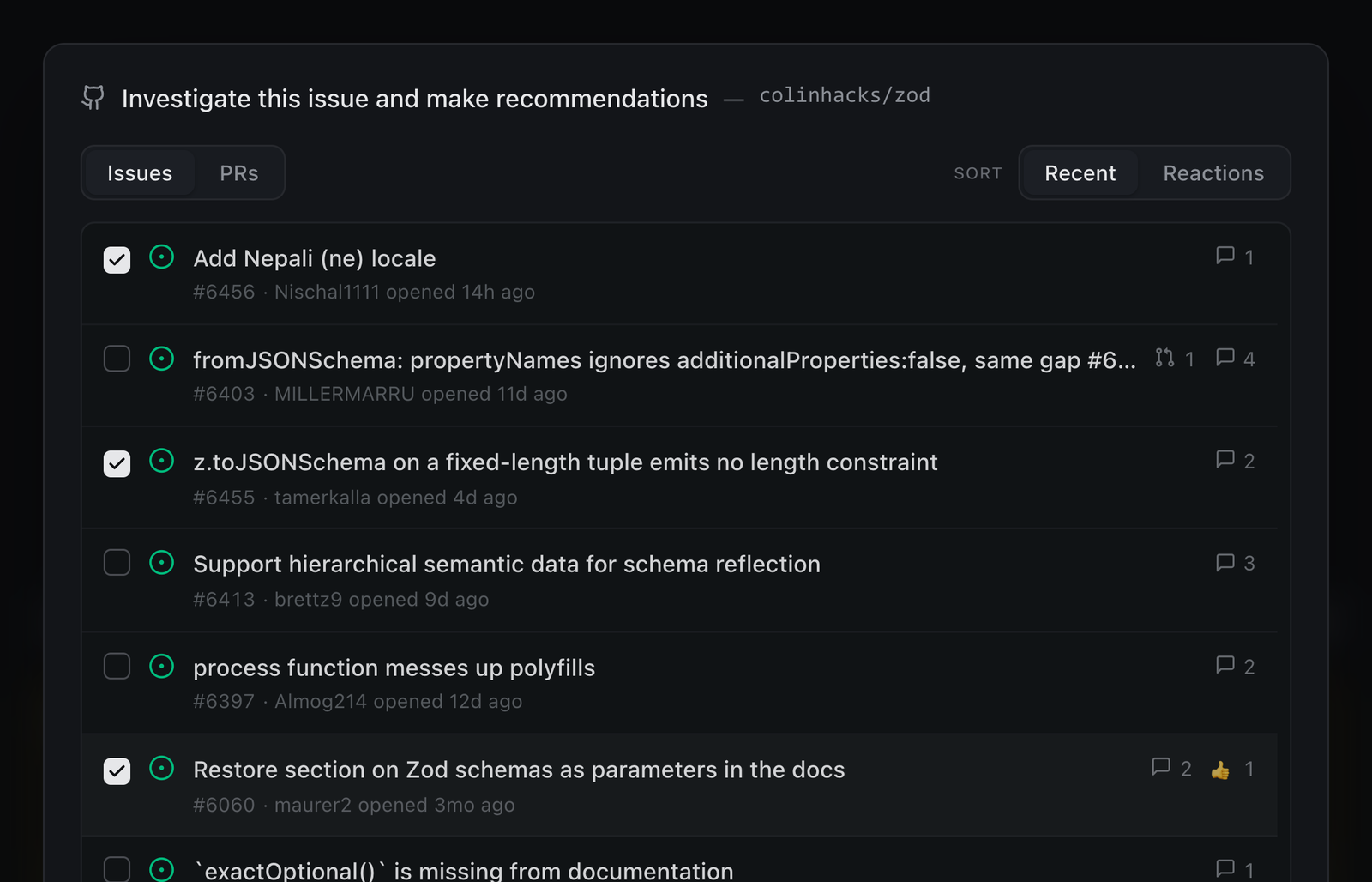
Workers can also read issues, diffs, and CI on their own — but only read. A worker never comments, labels, closes, or merges unless you ask it to.
Snooze
Park a thread for an hour, until tomorrow morning, or until a date you pick. Attach a follow-up prompt and the thread wakes up already working on it.
Goal
Give a thread a standing goal. Frizz sends it as a prompt every time the agent comes to rest, on a clock you set in minutes, or both — a scheduled send reaches the agent even mid-turn, without cutting off work in progress.
Launch prefix
Start every worker through a command of your own: a secret injector, a token proxy, a sandbox. Set it per project under the gear beside Claude Code or Codex in the model picker. With op run --env-file .env -- there, a new Claude worker starts as op run --env-file .env -- claude …, so the variables 1Password injects are in the worker's environment and nowhere on disk.
The command gets the worker's environment, and must run the command after it with stdin and stdout passed through and stay running until it exits (exec does both). Frizz splits the prefix into words like a shell would but never runs it in one, so for variables or pipes, write the shell in: sh -c 'export ANTHROPIC_BASE_URL="$(my-proxy url)"; exec "$@"' sh. Claude picks up a change on the next thread you dispatch. Codex's prefix wraps the app-server a project's Codex threads share, and Frizz restarts it once no Codex turn is running. With a prefix set, Frizz no longer refuses to dispatch when it finds no local sign-in, since the prefix may be what supplies the credentials.
CLI
$ npx frizz --help

Frizz production launcher

Usage: npx frizz [options]

Run it anywhere. One server serves EVERY project on this machine, each at its own
/project/<name> URL, so a second run joins the one already going. In a folder that is already a
project it opens that project's board; anywhere else it opens the dashboard, where projects are
added. Runs the npm-resolved immutable Frizz package, then opens it in your default browser. Use
frizz-dev only for a source checkout.
FAQ
Does Frizz run its own agent or model?
No. It drives Claude Code, Codex or OpenCode on your machine, under your own account. Your subscription, your rate limits, your settings. OpenCode also works with no subscription, on OpenCode's free models.
Frizz runs its own pinned copy of Claude Code and Codex — the exact build it was tested against — rather than whichever version happens to be on your PATH; set
FRIZZ_CLAUDE_BINorFRIZZ_CODEX_BINto point it at another one. OpenCode is the one on your PATH.
Does anything leave my machine?
Nothing from Frizz. There's no account, no telemetry, and the server binds to
127.0.0.1; reaching it from another device is something you switch on yourself (press R in its terminal). The agents themselves talk to their providers, and Frizz reads GitHub directly with the read-only sign-in you give it, but Frizz is a local process looking at local files.
What happens if I close the tab?
Nothing. Each thread's agent runs in its own detached background process, independent of the browser and of Frizz itself — you can stop Frizz entirely and your agents keep working. Relaunch, and it reconnects to the sessions that are still running.
Does it put junk in my repo?
Barely. Dispatching a thread writes no thread file into your repo — the agent session is the thread. All Frizz adds to your working tree is a
.frizz/directory holding a scratch directory per thread (empty unless the agent writes something in it) plus a couple of tiny hook state files. Everything durable lives outside your checkout, under~/.frizz/if you already have one and otherwise in your platform's own data directory (~/Library/Application Support/Frizzon macOS,$XDG_DATA_HOME/frizzon Linux, LocalAppData on Windows), so you can delete.frizz/and keep every thread and setting: Frizz knows the folder and gives it back its board the next time you open it. Only what an agent left in its scratch directory goes with it. The directory ignores itself, so it never shows ingit statusand your.gitignoreneeds nothing.
Do I have to use worktrees?
No. Frizz doesn't own your git workflow and won't create branches or worktrees behind your back. Tell your agents what you want in
FRIZZ.md. If you do run Frizz inside a linked worktree, it isolates that worktree's state from its siblings automatically.
Can I run it on several repos at once?
Yes. One Frizz server serves every project on your machine — you don't start one per repo. Run
npx frizzin any of them and switch projects from the board; each project's threads, settings and state stay separate.
Can I reach it from another machine?
Yes. Press R in the terminal running Frizz. A short walkthrough sets up one of four ways to reach the board — a frizz.sh subdomain, a Cloudflare Tunnel you own, Tailscale, or any proxy you run — checks what each needs, prints the commands, and remembers your choice. From then on a plain
npx frizzserves it; pick Off in the same place to go back to localhost only.To try any of this without touching the board you run, launch a second one with
npx frizz --sandbox— a throwaway home and project on its own port, deleted on ctrl-c.The board stays bound to
127.0.0.1in every case. Something in front of it — the frizz.sh relay, the tunnel, Tailscale, your proxy — carries the traffic, and Frizz gates the first visit with a single-use sign-in link shown as a QR. Press L for a fresh link any time, ornpx frizz --linkfrom another shell (over SSH, for a headless box). See Remote access for what each option needs.
Can I reach it from anywhere, not just my LAN?
Same answer: press R and pick a frizz.sh subdomain (a random address with no account, or your GitHub username through Frizz's GitHub sign-in), a Cloudflare Tunnel, or Tailscale. Each is reachable from anywhere the transport is — a frizz.sh subdomain and a Cloudflare Tunnel from the open internet, Tailscale from your own devices.
Frizz has no accounts, so the single-use sign-in link is the door: a phone that scans it gets a session; nobody else gets in. A session has full control of the board, apart from minting sign-in links and signing other devices out. On a frizz.sh subdomain you can limit it to reading the board and picking listed options on question cards (what a remote session can do). Sessions are per device and can be listed and revoked with
npx frizz --sessionsandnpx frizz --sign-out. Every project added or removed, thread started, message sent and question answered is recorded inlogs/audit.jsonlunder Frizz's data folder, with the session id of the device that did it and whether it came through that public address.
What platforms does it run on?
macOS, Linux, and Windows. Windows support landed once the last dependency that had no native Windows build was removed.
How is this different from the other orchestrator apps?
Those apps wrap your agents in their own workflow. Frizz doesn't: it's a viewer and a queue over the CLIs you already run, with every piece of orchestration judgment sitting in editable text instead of inside the binary.
Glossary
Frizz has its own small vocabulary. Most of it names a feature, so this doubles as an index of the opinionated parts.
| Term | What it means |
|---|---|
| Project | A folder you added to Frizz. Each has its own board at /project/<name>; one server holds all of them. |
| Thread | One effort, start to finish. Not a chat tab and not a branch. The session is the thread — there's no sidecar document to keep in sync, and dispatching doesn't write a file into your repo. |
| Worker | The agent driving a thread: a real Claude Code, Codex or OpenCode process, running as you, with your credentials and your CLI config. |
| Sub-agent | A helper a worker dispatches for an independent prong of its own task. Frizz binds each one back to its parent, so the fan-out is listed under the parent thread. |
| Rested | An agent that has ended its turn and is waiting on a human. A rested thread isn't idle, it's your move. |
| The queue | The single list of threads that need you. A thread only joins it when it genuinely wants a human. |
| Snooze | Hide a thread until later — an hour, tomorrow morning, or a date you pick — optionally with a follow-up prompt attached. |
Docs
ARCHITECTURE.md— the invariants, layout, and design decisions. Read it before changing anything.FRIZZ.md— this repo's own worker norms, as a worked example of the optional per-repo prompt.
Contributing
Issues and pull requests are welcome. Fork the repo, branch off main, and open the PR against main — CI runs on every pull request. Keep Allow edits by maintainers checked (GitHub offers it only on forks in a personal account, not an organization), so a follow-up commit from the maintainer can land in your PR rather than separately on main.
CI runs two jobs on every pull request. The first needs no install:
$ node --test board/*.test.mjs
$ node scripts/sync-portable-monitors.mjs --check
$ node --test monitors/*.test.mjsThe second installs the workspace, typechecks it and runs the suite. The same commands run locally:
$ npm install -g @nubjs/nub   # the suite runs through nub
$ pnpm install
$ pnpm typecheck
$ pnpm testThe browser tests run locally only, with pnpm test:e2e, which drives a headless browser. Say in the PR what you ran. The suite needs a newer Node than the runtime does: early 22.x point releases (22.15 measured) fail receipt-bus.test.ts on a since-fixed test-runner defect, so run it on current 22.x or ≥ 23.4.
License
MIT