contents
Yo Code - Extension and Customization Generator


We have written a Yeoman generator to help get you started. We plan to add templates for most extension/customization types into this.
Install the Generator
Install Yeoman and the VS Code Extension generator:
npm install -g yo generator-codeRun Yo Code
The Yeoman generator will walk you through the steps required to create your customization or extension prompting for the required information.
To launch the generator simply type:
yo code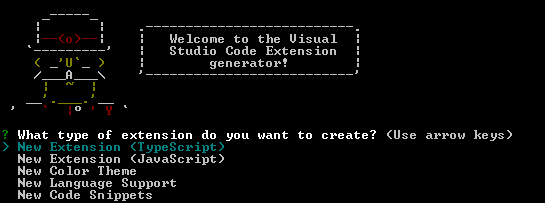
Generator Output
These templates will:
- Create a base folder structure
- Template out a rough
package.json - Import any assets required for your extension e.g. tmBundles or the VS Code Library
- For Extensions: Set-up
launch.jsonfor running your extension and attaching to a process
Command line
Usage:
  yo code [<destination>] [options]

Argument (optional):
  The destination to create the extension in, absolute or relative to the current working
  directory. Use '.' for the current folder.
  If not provided, defaults to a folder in the current working directory with the extension
  display name.

Options:
  -h,   --help                  # Print the generator's options and usage
  -i,   --insiders              # Show the insiders options for the generator
  -q,   --quick                 # Quick mode, skip all optional prompts and use defaults
  -o,   --open                  # Open the generated extension in Visual Studio Code
  -O,   --openInInsiders        # Open the generated extension in Visual Studio Code Insiders
  -t,   --extensionType         # ts, js, colortheme, language, snippets, keymap...
        --extensionId           # Id of the extension
        --extensionDescription  # Description of the extension
        --pkgManager            # 'npm', 'yarn' or 'pnpm'
        --bundle                # 'webpack', 'esbuild'. Bundle the extension with webpack or esbuild
        --gitInit               # Initialize a git repo

Example usages:
  yo code                       # Create an extension in a folder with the extension's name.
  yo code . -O                  # Create an extension in current folder and open with code-insiders
  yo code Hello -t=ts -q        # Create an TypeScript extension in './Hello', skip prompts, use defaults.
Run Generator using Docker
If you don't want to install nodejs or any node packages, use this method to containerize the generator.
Go into your project directory.
cd <project directory>Build the docker image from the docker file.
docker build -t vscode-generator-code .Create a docker container with volumes.
docker run -it -v $(pwd):/usr/src/app vscode-generator-codeLocal development
After making necessary changes, run npm link before running yo code to
test the local version.
You can learn more about Yeoman generator development on its documentation website.
History
- 1.0.0: Generates a VS Code extension for TypeScript 2.0.3
- 0.10.x: Generates a VS Code extension for TypeScript 1.8.10