contents
This repository will be merged with chrome-extension repository soon!
So please, open new issues only there! Thank you.
GitHub-Linker Core



This browserify friendly npm module contains everything what the GitHub-Linker needs to work. Currently the core is only used by the GitHub-Linker Chrome Extension. It would be possible to create other GitHub-Linker extensions for another browser as well. But this is currently out of scope. By the way, contributes are welcome. Get in touch with me!
Features
GitHub.com is constantly under development and therefore, sometimes some features doesn't work. Feel free to open an issue so I can solve it as soon as possible. Thank you.
Manifest files
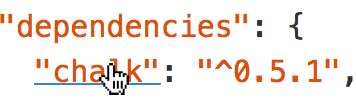
Replace dependencies listed in package.json bower.json or composer.json with the related GitHub repository. In this case, you will redirected to https://github.com/sindresorhus/chalk
It's also possible to click these attributes main, bin and directories in a manifest file to jump to the target file. In this case, you will redirected to https://github.com/yeoman/environment/blob/master/lib/environment.js

Require
This feature is not supported on any GitHub page, because it's unfortunately not possible everywhere.
This is one of the key features in the GitHub-Linker. It allows you to jump directly to the GitHub repository page of the named package. In this case, you will redirected to https://github.com/sindresorhus/chalk

It can handle locale require statements as well.

Also relative require statements.

Usage
var core = require('github-linker-core');
var $ = require('jquery');

var options = {
  showUpdateNotification: true,
  changelog: 'https://github.com/github-linker/chrome-extension/releases',
  version: '1.0.0'
};

core(window, options, function(err, result) {
  if (err) {
    return console.error(err);
  }
  console.log(result);
});
License
Copyright (c) 2015 Stefan Buck. Licensed under the MIT license.