See 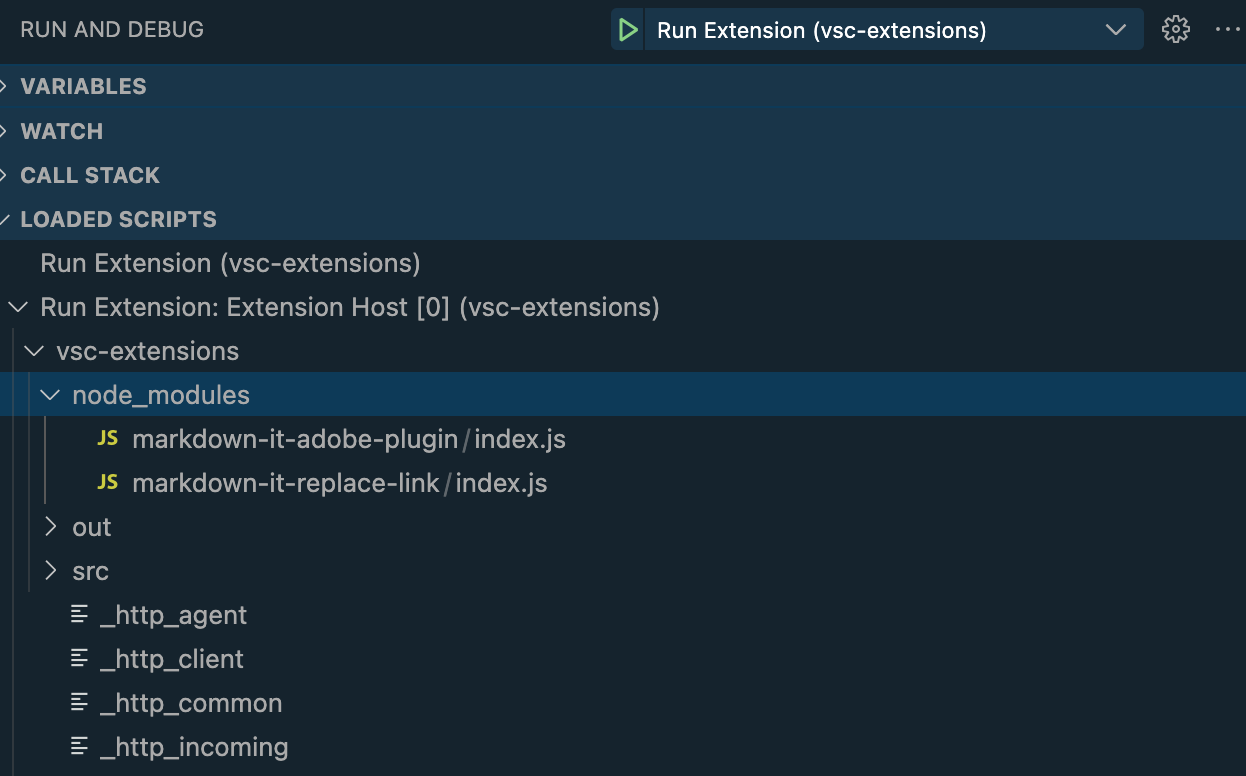
package
Markdown-IT plugin that supports rendering of Adobe Experience League documentation markdown language extensions.
npm install markdown-it-adobe-pluginGitHub-flavored package documentation.
Across all versions.
Download trend unavailable.
Runtime metadata.
Tagged topics.
Estimated unpacked size across 1 packages.
151.7 kB
Includes dependencies.
A markdown-it plugin to support rendering Adobe Flavored Markdown to HTML.
node.js
$ yarn add markdown-it-adobe-plugin
yarn add v1.22.17
info No lockfile found.
[1/4] 🔍  Resolving packages...
[2/4] 🚚  Fetching packages...
[3/4] 🔗  Linking dependencies...
[4/4] 🔨  Building fresh packages...
success Saved lockfile.
warning Your current version of Yarn is out of date. The latest
end58763
end58763@adobe.com
This plugin supports converting the following Adobe Flavored Markdown (AFM) tags from Markdown to HTML:
This plugin also converts AFM heading anchor suffixes into IDs for anchoring HTML links.
# This is a heading with an anchor at the end {#heading-anchor-tag}renders
<h1 id="heading-anchor-tag">This is a heading with an anchor at the end</h1>>[!NOTE]
>
>This is note text.Returns
<div class="extension note" data-label="NOTE">
<div class="p"></div>
<div class="p">This is note text.</div>
</div>>[!NOTE]
>This is note text.renders
<div class="extension note" data-label="NOTE">
<div class="p">This is note text.</div>
</div>>[!TIP]
>
>Here is a one-line tip. renders
<div class="extension tip" data-label="TIP">
<div class="p"></div>
<div class="p">Here is a one-line tip.</div>
</div>>[!IMPORTANT]
>
>Here is a one-line important message. renders
<div class="extension important" data-label="IMPORTANT">
<div class="p"></div>
<div class="p">Here is a one-line important message.</div>
</div>>[!WARNING]
>
>Here is a one-line warning. renders
<div class="extension warning" data-label="WARNING">
<div class="p"></div>
<div class="p">Here is a one-line warning.</div>
</div>>[!CAUTION]
>
>Here is a one-line caution. renders
<div class="extension caution" data-label="CAUTION">
<div class="p"></div>
<div class="p">Here is a one-line caution.</div>
</div>>[!ERROR]
>
>Here is unsupported alert markup. It should be unlabeled and just output a plain blockquote.renders
<blockquote>
<div class="p">[!ERROR]</div>
<div class="p">Here is unsupported alert markup. It should be unlabeled and just output a plain blockquote.</div>
</blockquote># Ordinary Blockquote
Here is an ordinary block quote:
>
> To err is human.
>
## Followed by a multi-line tip
>[!TIP]
>
> Make sure that everybody understands that tipping is necessary. Especially
> in these weird times in which we live.
>
> -- Rev. Dr. Martin Luther King, JRrenders
<h1>Ordinary Blockquote</h1>
<p>Here is an ordinary block quote:</p>
<blockquote>
<div class="p">To err is human.</div>
</blockquote>
<h2>Followed by a multi-line tip</h2>
<div class="extension tip" data-label="TIP">
<div class="p"></div>
<div class="p">Make sure that everybody understands that tipping is necessary. Especially
in these weird times in which we live.</div>
<div class="p">-- Rev. Dr. Martin Luther King, JR</div>
</div>>[!VIDEO](https://video.tv.adobe.com/v/17187/)renders
<div class="extension video">
<iframe class="p" allowfullscreen="true" embedded-video="true" style="position: absolute; top: 0; left: 0; width: 100%;" src="https://video.tv.adobe.com/v/17187/"></iframe>
</div>>[!MORELIKETHIS]
>
>- [Adobe Experience League](https://experienceleague.adobe.com)
>- [Markdown-It Extension](https://github.com/markdown-it/markdown-it)
>- [Microsoft Docs Authoring Extension](https://docs.microsoft.com/en-us/contribute/how-to-write-docs-auth-pack)renders
<div class="extension morelikethis" data-label="MORELIKETHIS">
<div class="p"></div>
<ul>
<li><a href="https://experienceleague.adobe.com">Adobe Experience League</a></li>
<li><a href="https://github.com/markdown-it/markdown-it">Markdown-It Extension</a></li>
<li><a href="https://docs.microsoft.com/en-us/contribute/how-to-write-docs-auth-pack">Microsoft Docs Authoring Extension</a></li>
</ul>
</div>Here is just a plain paragraph with [!DNL Unlocalized] text in it. renders
<p>Here is just a plain paragraph with Unlocalized text in it.</p># [!DNL Do Not Localize] the preceding stringrenders
<h1>Do Not Localize the preceding string</h1>Here is just a plain paragraph with [!UICONTROL localized] text in it. renders
<p>Here is just a plain paragraph with localized text in it.</p># [!UICONTROL Should be localized] the preceding stringrenders
<h1>Should be localized the preceding string</h1>var md = require('markdown-it')()
.use(require('markdown-it-adobe-plugin'));The plugin does not require or use any parameters.
var md = require('markdown-it');
var adobePlugin = require('markdown-it-adobe-plugin');

var parser = md().use(adobePlugin);

var str = `# Ordinary Blockquote
Here is an ordinary block quote:
>
> To err is human.
>
## Followed by a multi-line tip
>[!TIP]
>
> Make sure that everybody understands that tipping is necessary. Especially
> in these weird times in which we live.
>
> -- Rev. Dr. Martin Luther King, JR`

var result = parser.render(str);

console.log(result);

// <h1>Ordinary Blockquote</h1>
// <p>Here is an ordinary block quote:</p>
// <blockquote>
// <div class="p">To err is human.</div>
// </blockquote>
// <h2>Followed by a multi-line tip</h2>
// <div class="extension tip" data-label="TIP">
// <div class="p"></div>
// <div class="p">Make sure that everybody understands that tipping is necessary. Especially in these weird times in which we live.</div>
// <div class="p">-- Rev. Dr. Martin Luther King, JR</div>
// </div>This module is a plug-in for Markdown-It. To debug it in VS Code, you need to debug the Extension that loads Markdown-It, which in turn loads this module.
See