Documentation ·
Playground — edit
react-x11 and watch it render, in your browser, against a JavaScript X server
running on the page.
A React renderer for desktop applications, whose host is a display
system rather than a document. React's job in a renderer is to compute what
changed; the renderer's job is to turn that into side effects on some host —
in react-dom those are DOM mutations, here they are X11 protocol requests
written to a socket, Core Animation layers and CoreGraphics drawing on
macOS, Direct2D drawing on DirectComposition surfaces on Windows, or GL
frames handed to a compositor. There is no DOM and no browser
engine underneath: this is not Electron with a different skin, and is
not an element that exists. Build GUI programs for a Linux desktop, for a
display at the other end of an ssh connection, as a native Mac app or a
Windows one, with your React / React Native experience — flexbox layout,
components, hooks, synthetic events.
Wayland
<div>
Four backends, one tree
The same components, the same hooks and the same style objects run on all
of them. The two that are mature:
X11 (the flagship) — a Linux desktop, a display
forwarded over ssh -X, Xvfb in CI, a thin client, or macOS through
XQuartz. Everything is JavaScript all the way
down: ntk / node-x11 implement
the X11 protocol in pure JS (think xlib rewritten in node.js).
Cocoa (docs/macos.md) — a real Mac app: NSWindows,
the menu bar at the top of the screen, AppKit's own control bezels, native
open/save panels, native notifications, Core Animation compositing. No X
server anywhere. It rides on
@windowkit/appkit, a
thin mechanism-only Objective-C++ bridge — an optional dependency shipping
prebuilds, absent on Linux installs.
createRoot() picks for you: Cocoa on macOS and win32 on Windows
when the matching bridge is installed, X11 via $DISPLAY everywhere else —
and X11 on either of those without its bridge, so an XQuartz or WSLg setup
keeps working. createRoot({ backend: 'x11' }) or REACT_X11_BACKEND=x11
pins it. On macOS the app's JS runs on a worker
while AppKit keeps the main thread, so a menu, a drag or a live resize never
stops it — node app.js is enough, and REACT_X11_THREADED=0 keeps the
main thread (docs/macos.md).
Two more backends exist beside these, serving the goal of full
cross-platform support, and both are younger than the two above.
native Wayland (docs/wayland-backend.md) —
the wire protocol in JavaScript and a GLES rasterizer of its own, on mutter,
sway and labwc, with no Xwayland in the path — is opt-in
(REACT_X11_BACKEND=wayland) rather than automatic, because X11 stays the
default on Linux: the remote case is the flagship reason this project exists
and Wayland has no network transparency. Windows
(docs/windows.md) — Win32 windows, Direct2D and
DirectWrite, DWM compositing through DirectComposition — is the default on
Windows, with the keyboard, an IME, a screen-reader bridge and most of the
desktop integrations in place
(docs/windows-integrations.md is the
measured list). Each is a backend beside the others rather than a
replacement for any of them: the same tree, the same components, the same
style objects.
Layout is yoga-layout (WASM) on
every backend, and text shaping is fontkit
through ntk on X11 and Wayland, CoreText on Cocoa and DirectWrite on Windows.
npm install never compiles anything: the X11 stack is JavaScript all
the way down, and the native addons in the tree — the Cocoa and win32
bridges, and x11-dri for direct GL and the Wayland socket — are optional
dependencies that ship prebuilt. And npm test doesn't even need
an X server (node-x11 ships an in-process pure-JS X server that the tests
render into and read pixels back from; every screenshot below was rendered
that way too, by driving the real examples through the real event
pipeline).
On X11, the wire carries drawing, not pixels
react-x11 does not rasterize a frame on the client and ship the buffer
across. React reconciles the component tree, the renderer turns that diff
into drawing operations — rounded rectangles, composited gradients, clip
regions, runs of glyph indices — and the X server executes them. The server
owns the pixels; the client never had them.
That is what X's RENDER extension is for. Text is shaped once and its glyphs
uploaded once, so drawing a line afterwards names them by index, about a byte
per glyph; gradients, scaling, alpha compositing and clipping are single
server-side requests rather than loops over a pixel array; nothing is read
back. An update costs what the drawing costs, not what the window's area
costs. Going full-screen on a 4K panel does not multiply your bandwidth,
because you were not sending pixels at 1080p either — which is why this
stays comfortable on a display forwarded over ssh. Mounting a window with
forty rows and their labels is 110 requests and 4.2 KB on the wire, and
stalls the pipeline on none of them.
Because that is the design it is measured rather than assumed: npm run bench reports requests, bytes, replies, blocking round trips, RENDER
composites and the pixel area those composites touch, against a checked-in
baseline (scripts/bench/baseline.json, which is where the numbers in these
docs come from).
The Cocoa backend inverts this, and design/macos.md is the
design record for why: there is no wire, the WindowServer is a retained
compositor, and a React commit maps onto property mutations of persistent
objects. Scrolling is a layer's bounds.origin rather than a repaint,
animations run in the render server while the JS thread is busy, and Retina
is composited at native resolution instead of quadrupling every rasterized
pixel.
Where this fits
X11 is the wire protocol, which means the display can be somewhere the
program is not, and the program can be somewhere a browser engine cannot go.
That is the shape of the problem this is good at:
the display is elsewhere — a headless server over ssh -X, a
container pointed at the host, a thin client, an X terminal, a
deliberately dumb workstation. A whole window appears for about four
kilobytes, because what crosses the link is drawing rather than pixels
(docs/remote.md);
the machine cannot afford a browser engine — a kiosk, an appliance, an
instrument panel, an ARM board with 512 MB, a locked-down box where
installing must not compile anything and root is not on offer;
you want the UI in the same process as the rest of your program —
fs, serialport, pg and your components in one heap, one event loop,
no IPC bridge and no second bundler;
you want GUI tests that run in CI with no display server — npm test
here renders real pixels through the real protocol into node-x11's
in-process X server, on a machine with no $DISPLAY, on macOS. That
harness is published as react-x11/test
(docs/testing.md).
you want a Mac app out of the same source — the Cocoa backend is a
real one: system menu bar, native panels and notifications, layer-backed
compositing, and a Developer-ID-signed .app from either node or bun
(the App Store's sandbox takes node only —
docs/packaging.md).
And the shape it is not good at, so you can stop here rather than in week
three:
Windows — today. The Windows backend is young, and further along than
that sounds. Win32 windows composited by DWM through DirectComposition,
Direct2D and DirectWrite behind the same contracts the Cocoa backend
proved, OpenGL, the keyboard and all five mouse buttons, popups, the
clipboard, file dialogs, the tray, the taskbar, global hotkeys,
notifications and window states — on a mechanism-only bridge shaped like
the Cocoa one, with a test suite and CI of its own. The examples run.
Drag and drop works both ways with the desktop, and the taskbar's own
surfaces — a thumbnail toolbar, a jump list, recent documents — are there
behind a capability, so an app that also runs elsewhere asks
useSupports() rather than the platform. CJK input goes through an
IMM32 input method and screen readers through a UI Automation provider of
the project's own, both with gaps worth reading before you rely on them:
no voice typing or handwriting (those want a TSF text store), and no
caret-by-caret reading inside a text field yet. Nor is there activation —
file associations, URL schemes and second launches — so an app that needs
any of that on Windows this month still wants Electron or Tauri.
docs/windows-integrations.md is the
measured status and design/windows.md the design. The three
targets are not the same app: the desktop-shell half of X11 (<foreign>
embedding, panel struts, substructure redirect, the window-manager example
below) has no macOS or Windows equivalent, and react-x11/test drives the
X11 backend only. docs/macos.md says which is which.
native Wayland — today. The native backend is opt-in and young:
windows, text, input, an input method, the clipboard, popups, drag and
drop and layer-shell docks and panels run on mutter, sway and labwc, and
docs/wayland-backend.md lists what
is left — no multisampling, no <Frame> panes, no drag icon. Ordinary
application windows also work on a Wayland desktop through Xwayland, which
is not going away — but the desktop-shell half of X11 (<foreign>
embedding, global key grabs, and the window-manager example below) needs a
real X session. It is a target beside X11, not a migration;
design/wayland.md is the RFC it was built from.
reusing web components. There is no DOM. Your MUI, your Tailwind and
your recharts do not come with you; the state, data-fetching, validation
and math libraries mostly do. docs/ecosystem.md says
which is which, and what the failure looks like when it is the wrong one.
being a browser. There is no webview and no browser engine to embed.
HTML is a component rather than a substrate: <Html> in
@react-x11/components
renders an HTML + CSS document with a layout engine of its own — selectable,
with real widgets for its form controls, and with a page's scripts run
against a DOM when scripts turns them on — and <Markdown> beside it
renders markdown. Both are for documents an app shows; an app that is a
web app still wants Electron or Tauri.
The screenshots below are the X11 backend, rendered headlessly into
node-x11's in-process server by npm run screenshots — which is why they
are pixel-stable enough to check in.
examples/viewer3d.jsx — a model viewer over indirect GLX: the GL
protocol sent over the X connection, geometry compiled into a display list,
a frame costing two matrices and one CallList. No native bindings, no GPU
driver bindings — the same "JavaScript all the way down" story as the rest.
(GL renders where the X server cannot read it back, so there is no
screenshot of it here; see docs/gl.md.)
Run it with tsx or any JSX-capable loader — or skip JSX entirely with
React.createElement (see
examples/simple-nojsx.js, plain node, no build
step).
Elements
Only <window>, <popup>, <glarea> and <foreign> are real windows of
the display system. Everything else is a retained lightweight node — one
yoga node each — drawn client-side into the owning window's double-buffered
2d context, with events dispatched by front-to-back hit testing over the
drawn tree. See docs/elements.md for the full reference.
element
what it is
<window>
a real toplevel — an X11 window, or an NSWindow; the flex, paint and event root
<popup>
an undecorated window placed at screen coordinates — menus, tooltips, dropdowns. anchor places it against a node; grab and trapFocus make it modal
<box>
flex container: layout props → yoga, plus backgrounds, borders (solid/dashed, radius), overflow clipping, zIndex. overflow: 'scroll' makes it a wheel-scrollable viewport with a drawn scrollbar
<text>
shaped, wrapped text (bidi, ligatures, font fallback); nested <text> elements are style spans
<textinput>
single-line editor: caret/selection, clipboard, word select, undo/redo, right-click menu
<textarea>
the same editor, wrapped and multi-line, scrolling with its content
<image>
PNG/JPEG/WebP from src (more formats under Bun), natural-size aware; also pixels the server already has
<canvas>
escape hatch: onDraw={(ctx, {width, height}) => …} with a canvas-like 2d context (XRender-backed on X11, CoreGraphics on Cocoa)
<video>
decoded frames the app pushes, on every backend, or a src the platform plays itself where it has a player
<svg>
static SVG (paths, shapes, gradients, transforms), sized like <image>
another application's X window, laid out as an element. X11 only (docs/embedding.md)
registerElement() adds one from outside the package —
docs/extending.md.
Widget components (plain React on top of the primitives, themable via
ThemeProvider): Button, Checkbox, Radio/RadioGroup, Switch,
Slider, ProgressBar, Select, Tooltip, Icon, MenuBar/ContextMenu,
PasswordInput — whose mask is a scribble that moves on every keystroke
rather than a countable row of bullets — Dialog, a modal built on
<popup trapFocus> which traps Tab and restores focus when it closes,
FileDialog, the two containers an application window is built from —
Tabs and SplitPane — and a virtualized Table. See
docs/components.md. Richer widgets — Markdown,
Tree, Calendar/DatePicker, a three.js scene graph — live in
@react-x11/components.
The menu bar goes where the desktop keeps menus. On the Cocoa backend
<MenuBar menus={…}/> becomes the macOS menu bar at the top of the
screen. On Plasma, on a panel running vala-panel-appmenu, or under one of
the GNOME extensions that add a menu bar, it hands its menu to the panel
over com.canonical.dbusmenu. Everywhere else — a stock GNOME session,
XQuartz, ssh, CI — it draws the bar itself. No configuration, and the same
line of JSX every time: the item descriptors are dbusmenu's own vocabulary,
so the array that draws the menu is the array that serialises and the array
that becomes an NSMenu. npm run globalmenu:host is a panel in a
terminal, for seeing the D-Bus path work on a desktop that has none. See
docs/globalmenu.md.
myapp:// links open the app that is already running.registerApplication({ appId, schemes }) before createRoot() takes the two
dispatch paths a real desktop uses: on Linux it owns the app's name on the
bus, exports org.freedesktop.Application, and — on the half of all desktops
where xdg-open ignores D-Bus activation and spawns a second copy with the
URI in argv — forwards it to the first copy and tells that copy to exit; on
macOS the link arrives as an Apple Event through the bridge. useAppOpen()
receives it either way, buffered and replayed if it arrived before the tree
mounted, and activateWindow() brings the window forward — with the launch's
own timestamp on X11, without which a window manager declines and the taskbar
entry just blinks. The OAuth redirect this is for has an easier answer that
needs none of it, and the page says so first. See
docs/uri-schemes.md.
Drag and drop works with the rest of the desktop on every backend —
XDND on X11, NSDraggingSession on Cocoa, OLE on Windows, wl_data_device
on Wayland. <box dropAccept={['files']} onDrop={…}> takes a file dragged out of Nautilus or Finder, and
<box draggable dragData={…}> can be dropped into a file manager or an
editor. Drags that stay inside the app never touch the wire and hand their
payload over by reference, so a reorderable list and a cross-application
file drop are the same two props.
See docs/drag-and-drop.md.
The desktop around the app
Everything an app does outside its own windows is a ladder: the best
rung the machine actually has, the same hook whichever one answers, and a
first-class "this desktop cannot" rather than a throw.
NSColorSampler · the portal's picker · a crosshair grab on plain X11
a badge on the icon setBadge()
NSDockTile.badgeLabel / a taskbar overlay icon · com.canonical.Unity.LauncherEntry
a tray icon useTray()
NSStatusItem / Shell_NotifyIcon · org.kde.StatusNotifierItem — available is false on a desktop with no tray host, such as stock GNOME
docs/system.md is the rest of the machine — monitors,
window state, idle, keyboard layout, locale — and
docs/desktop.md is what the app tells the desktop about
itself.
3D
<glarea> is a GL surface in the layout, with the same onDraw over every
way underneath it — three on the mature backends:
indirect GLX (the X11 default) — the GL protocol encoded into the X
connection, no native bindings and no GPU driver bindings, the same
"JavaScript all the way down" story as the rest. Geometry belongs in a
server-side display list, so a frame costs matrices and one CallList
whatever the triangle count. No shaders and no render targets: the
protocol encodes neither.
direct (glPolicy: 'auto', ntk's optional x11-dri addon) — GL ES 2
on the GPU, with GLSL and framebuffer objects. DRI3 + Present on Linux,
Apple-DRI under XQuartz.
Cocoa — CGL into IOSurface-backed framebuffers, presented as a
sublayer of the window; shaders and render targets, on any Mac, with no
X server involved.
The two younger backends have their own: WGL on Windows, composited through
DirectComposition (design/windows-gl.md), and on Wayland
a viewport into the window's own GLES target.
A scene graph over it — <mesh>, geometries, materials, lights, and shaders
or post-processing where the backend has them — is
@react-x11/components/three.
See docs/gl.md.
Events are synthetic with capture/bubble phases and hit testing over the
drawn tree: onClick (with DOM-style detail click counting),
onMouseDown/Up/Move, onMouseEnter/Leave, onWheel, onKeyDown/Up,
focusable + onFocus/onBlur + Tab traversal, and a cursor prop.
User handlers run before element default actions and can
ev.preventDefault() — stopping a <textinput> from editing or a
a scroll container from scrolling, like the DOM.
Examples
On macOS and Windows these run natively, with no X server; everywhere else
they need one — and "an X server" is a broader thing than it sounds: your Linux
desktop, XQuartz, Xvfb for automation, Xephyr for a disposable screen, a
VNC server, or your own display reached over ssh -X from wherever the
program actually runs — see docs/remote.md, which is the
case this architecture is categorically better at. REACT_X11_BACKEND=x11
in front of any of them runs the X11 path on a Mac too, which is how the two
get compared.
examples/README.md describes each one and how to
explore them:
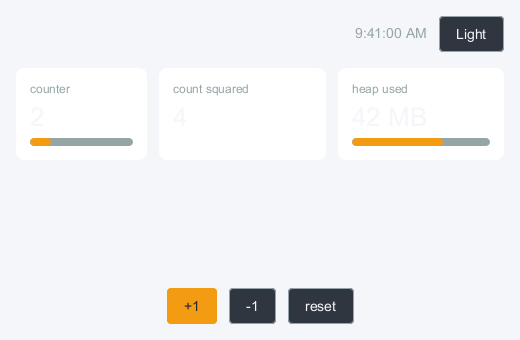
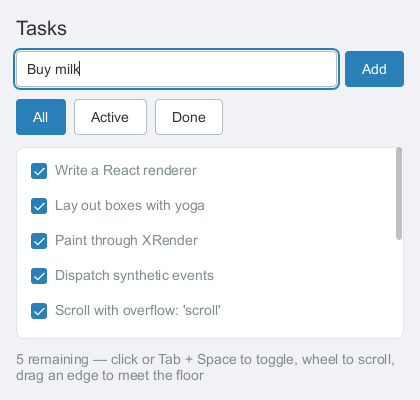
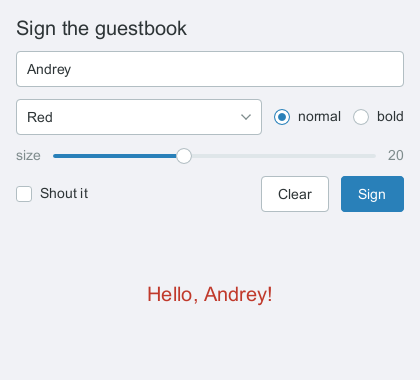
npm run examples:simple # hello world (JSX via tsx)npm run examples:app # the showcase: Tabs + SplitPane hosting the restnpm run examples:widgets # every built-in control, in one windownpm run examples:theming # three themes x light/dark, and a size querynpm run examples:container-queries # one card, two panes: '@container', and a named onenpm run examples:custom-layout # masonry, a justified gallery, CSS grid, and equal-row controlsnpm run examples:simple-nojsx # the same, plain node — no build stepnpm run examples:xeyes # canvas drawing + hooksnpm run examples:dashboard # context theming, custom hooks, componentsnpm run examples:tasks # useReducer, textinput, scrollingnpm run examples:menu # right-click context menu via <popup>npm run examples:transparent # rounded translucent <popup transparent>npm run examples:animation # transitions and loops, and which backend runs themnpm run examples:form # <textinput> + Select dropdownsnpm run examples:password # PasswordInput: the scribble mask, and a custom onenpm run examples:calendar # the desktop's own calendar events, no OAuthnpm run examples:dnd-source # and :dnd-target — drags in and out of the desktopnpm run examples:frame # <Frame>: a pane of the app in its own processnpm run examples:stress # the perf scenarios the benches are cut fromnpm run examples:viewer3d # raw GL in a <glarea>: a model viewer over indirect GLXnpm run examples:wm # a reparenting window manager (X11 only, see below)
On the X11 backend the GL examples additionally need a server with
indirect GLX enabled (+iglx / AllowIndirectGLX — off by default on
many), or glPolicy: 'auto' and ntk's x11-dri addon. On Cocoa they need
neither.
Window manager
examples:wm is a real reparenting window manager, and it is X11 only —
substructure redirect has no macOS, Windows or Wayland-client equivalent, so
this is one of the places the backends are not the same app. It takes over the root window, puts
every application's window inside a frame it draws, and moves, resizes,
focuses and closes them. The frames are ordinary react-x11 <window>s — the
titlebar, the buttons and the eight resize handles are components with
onMouseDown handlers, and the application is a foreign X window reparented
inside.
Only one window manager may own a display, so run it against a nested
server rather than the one managing your desktop:
Xephyr :10 -screen 1200x800 &DISPLAY=:10 npm run examples:wmDISPLAY=:10 xterm & # give it something to manage
To have it manage your real session instead — including replacing
quartz-wm on macOS, which XQuartz has a hook for — see
examples/README.md.
Hot reloading
npm run examples:tasks:hot # then edit examples/tasks.jsx while it runs
Runs the tasks example under react-x11 dev, with React Fast Refresh
(Node ≥ 22.15): saving examples/tasks.jsx updates the edited components
in place. The connection, the mounted window, and component state — the
task list, even half-typed text in the input — survive the reload (a
component whose hook signature changed remounts alone). Any app adopts it
the same way, with no accept handlers and no entry file to write:
npx react-x11 dev app.jsx mounts the file's default export, in a window
of its own while the tree renders none, and offers to install the toolchain
on its first run; see
docs/ecosystem/dev-tooling.md.
React DevTools
npx react-devtools # 1. start the standalone UIREACT_X11_DEVTOOLS=1 npm run examples:dashboard # 2. run any example with the bridge on
Under npx react-x11 dev the bridge is on by default (with
react-devtools-core installed): run npx react-devtools, before or after,
and the app shows up.
The component tree, props and hook state show up live in the DevTools
window, and editing any of them re-renders the app. Hovering an element in
the tree tints its rect in the app's window; the toolbar's crosshair picks
an element by clicking it in the app; "highlight updates when components
render" outlines the rects that just re-rendered; the style editor edits a
selected element's style live; and the Profiler can restart the app to
record its mount. All of it is above the display system, so it works the
same on every backend. REACT_X11_DEVTOOLS_HOST /
REACT_X11_DEVTOOLS_PORT override the default localhost:8097. See
docs/devtools.md.
Three more debugging aids:
REACT_X11_DEBUG_LAYOUT=1 outlines every laid-out node (color = tree
depth) — handy when a flexbox doesn't do what you expect.
REACT_X11_DEBUG_PAINT=1 strokes each frame's damage rects in a rotating
colour, so a region repainting every frame strobes visibly;
REACT_X11_TRACE records the X11 protocol. Both are
docs/debugging.md.
refs give you the retained node (abs rect, scrollTo, …) for drawn
elements, or the live window object for <window>/<popup> — on X11
that is the ntk window and the whole
ntk API with it.
Click to component
REACT_X11_EDITOR=code npm run examples:tasks
Alt+Click any rendered element (Option+Click on macOS, either backend) to
open the JSX line that created it in your editor. REACT_X11_EDITOR picks
the CLI and enables the feature in one go; REACT_X11_CLICK_TO_COMPONENT=1
does the same with the default editor
(cursor), and npx react-x11 dev turns it on by default. See docs/click-to-component.md.
TypeScript
Types ship with the package — no @types/react-x11 to install. Point JSX at
react-x11 and the host elements type-check:
import { createRoot, createStyles, Button } from 'react-x11';import type { MouseEvent } from 'react-x11';const s = createStyles({ root: { flexGrow: 1, padding: 12, gap: 8 }, // ^ flexDirection: 'sideways' would not compile, // and neither would a layout property inside ':hover'});<window title="hi" width={320} height={200} style={s.root}> <box onClick={(ev: MouseEvent) => console.log(ev.detail)}> <text style={{ fontSize: 18 }}>hello</text> </box> <Button primary onPress={() => {}}> ok </Button></window>;
jsxImportSource is what makes <div> an error rather than something that
compiles and then throws at runtime: react-x11 owns the JSX namespace
instead of adding to React's, which it could not do anyway — text,
image, canvas, html and svg are all DOM element names too, with
incompatible props.
Style props, element props, event objects, ref types and every widget are
typed; style accepts the same nested arrays with falsy entries the runtime
does. See docs/typescript.md.
Developing
npm test # hermetic: mock smoke tests + in-process X server pixelsnpm run typecheck # tsc over the declarations and the type testsnpm run lint # ESLintnpm run format # Prettiernpm run bench # protocol cost against scripts/bench/baseline.jsonnpm run bench:frames # frame timings; bench:pixels for the pixel-hash gatenpm run screenshots # regenerate docs/img/*.png headlessly (no X server)npm run docs:dev # the documentation site (npm install in website/ first)
The test suite drives the X11 backend against node-x11's in-process
server; the Cocoa backend's own tests run against a fake bridge, and its
pixels are checked by hand on a Mac. 3D is the other exception: the headless
path has no GL, so a 3D shot has to be captured from a real server with
indirect GLX.
See AGENTS.md for architecture notes and contributor/agent
guidance, docs/ for API documentation,
design/ for the design records behind the bigger
pieces and the backends, and NEXT_STEPS.md for the older roadmap it
grew out of.
The documentation site lives in
website/ and renders docs/ rather than repeating it — edit
docs/ and the site follows. Its playground bundles this repo's src/ for
the browser, so npm run docs:test fails when a demo stops matching the API.
Known issues
Worth knowing before you hit them. Both are X11-backend problems that
come out of X's own keyboard and font models; neither applies to a Mac app
on the Cocoa backend, where CoreText resolves families and NSEvent reports
the character that was actually typed.
sans-serif can resolve to a CJK font on macOS
(#86). Font families
are resolved by shelling out to fc-match, which follows PATH;
Homebrew's fontconfig ships no macOS system-font aliases and answers
Hiragino Sans. Latin looks fine, Cyrillic comes out on full-width
advances. Put /opt/X11/bin first on PATH until this is fixed.
AltGr levels do not work, and there is no input method.@ on a
German layout, €, ł, ã on US-International: the core keyboard map
cannot say whether the third and fourth keysyms on a key are a second
layout or a third and fourth level, so they are read as a layout and left
alone. Dead keys, Compose and layout switching all work
(docs/events.md); what is absent is an ibus/fcitx/XIM
backend, so CJK is not partially working — it is structurally absent. On
Cocoa the character arrives with the event, so AltGr-style levels type;
an NSTextInputClient IME for CJK is not built there either.
On the other two backends the input method is the platform's: the
Wayland backend speaks zwp_text_input_v3 to the compositor's IME, and the
Windows one answers IMM32, so CJK composes on both
(docs/windows-integrations.md has Windows'
limits).
Two more places the backends genuinely differ, so you can plan around them
rather than discover them: react-x11/test drives the X11 backend only,
and the accessibility bridges are AT-SPI on Linux and UI Automation on
Windows — on Cocoa createRoot() leaves accessibility off, and an
NSAccessibility bridge is not built yet
(docs/accessibility.md).
Security
On X11, there is no isolation between clients: any program on a display
can read any other program's window contents, grab the keyboard, and
synthesize or record input. That is the 1987 design, not a gap in this
library, and it cuts both ways — do not run untrusted programs on a display
you use, and do not treat a react-x11 window as a confidential surface. Your
$XAUTHORITY cookie is a bearer token; treat it like a password. (macOS
does isolate applications from one another, so a Cocoa-backend app does not
inherit this; what it inherits instead is TCC, where the camera, the
microphone and the screen are permissions the user grants —
docs/permissions.md.)
ssh -X runs your app as an untrusted client and restricts most of the
above; ssh -Y turns the restrictions off. Prefer -X — react-x11 should
work under it, and if it does not, that is a bug worth filing.
The full threat model, including what react-x11 does and does not defend
against, is docs/security.md. To report something,
SECURITY.md.
Similar projects
GPUIX — React for
GPUI, Zed's
GPU UI framework. Each commit crosses a napi-rs addon as one batch of
mutations to a retained Rust tree, which GPUI lays out with Taffy's flexbox
and paints through Metal, DirectX or Vulkan, on macOS, Windows and Linux.
react-native-gpui — React
Native's component API (View, Text, Pressable, TextInput,
FlatList) on GPUI as well, hosted the other way round: a Rust binary
embeds the system's JavaScriptCore and runs the bundled app, and commits
reach GPUI in memory. macOS on Apple silicon only, for now.
GTKX — React for GNOME: every GObject
is a JSX element, so the tree is the platform's own GTK4 and Adwaita
widgets. The TypeScript bindings are generated from GObject-Introspection
and call into GTK through a Rust core on Node.js. Linux-only by design.
React Native for Windows
and macOS — Microsoft's
desktop platforms for React Native. On Windows the new architecture's
renderer targets Composition from the start, in Windows App SDK apps by
default, with XAML islands for advanced controls; on macOS a fork of React
Native maps its UIKit views onto AppKit. design/windows.md
cites its threading as prior art: JS on a thread of its own, and every
mount posted to the UI thread that alone touches the visuals.
React Native Skia — 2D
graphics for React Native, with a React renderer of its own: the
components inside a <Canvas> become a Skia display list, cheap to
animate with Reanimated. On iOS, Android, macOS and tvOS, in the browser
through CanvasKit, and headless on Node. Its experimental Graphite builds
render through Dawn and can share a GPU device with React Native WebGPU.
React Native WebGPU —
not a renderer but a GPU surface for React Native: the WebGPU API
(navigator.gpu and a <Canvas> view) on iOS, Android, macOS and
visionOS, implemented over Dawn, Chrome's WebGPU implementation. It runs
three.js's WebGPU renderer and React Three Fiber. The nearest thing in
react-x11 is <glarea>, which speaks GL instead.
See also
awesome-react-renderer
— the catalogue of React renderers, which is how most people find things
like this.
ntk — the toolkit under the X11
backend: windows, the XRender-backed 2d context, the text stack, the frame
clock.
node-x11 — the X11 protocol in
JavaScript, including the in-process X server the tests and the playground
run against.
@windowkit/appkit —
the Cocoa bridge: NSWindows, CALayer trees, CoreText, CoreGraphics
surfaces, and an NSApplication event pump driven from Node's own loop.
Mechanism only, no policy — the renderer owns that.
@react-x11/components
— widgets over the primitives: Markdown, Tree, Calendar, a terminal,
a three.js scene graph.