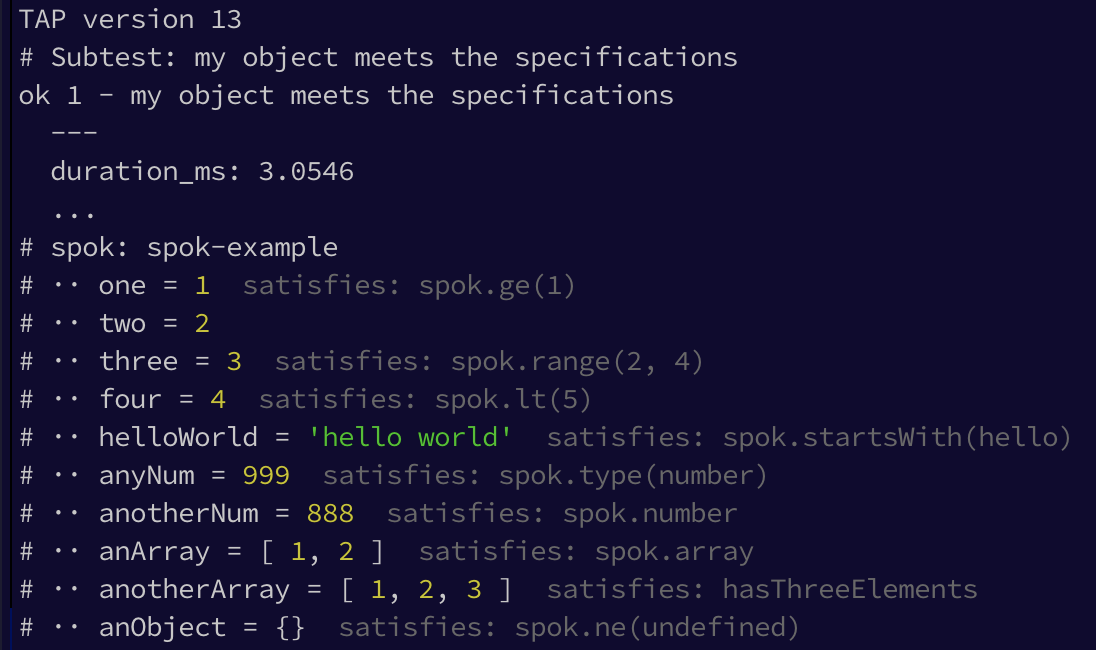
Checks a given object against a given set of specifications to keep you from writing boilerplate tests.
const test = require('node:test') // or: const test = require('tape') // or: const test = require('tap') const spok = require('spok')// this would be returned from a function you are testingconst object = { one : 1 , two : 2 , three : 3 , four : 4
, helloWorld :
'hello world'
, anyNum : 999
, anotherNum : 888
, anArray : [ 1, 2 ]
, anotherArray : [ 1, 2, 3 ]
, anObject : {}
}
// custom specification
function hasThreeElements(a) {
return a.length === 3
}
test('my object meets the specifications', (t) => {
spok(t, object, {
$topic : 'spok-example'
, one : spok.ge(1)
, two : 2
, three : spok.range(2, 4)
, four : spok.lt(5)
, helloWorld : spok.startsWith('hello')
, anyNum : spok.type('number')
, anotherNum : spok.number
, anArray : spok.array
, anotherArray : hasThreeElements
, anObject : spok.ne(undefined)
})
})
Installation
npm install spok
Node.js Test Runner
Since Node.js 16.x it includes a built-in test runner.
Spok support this out of the box as follows:
it uses the build-in assert module to assert the values
it uses the passed t: TestContext to print diagnostic messages that detail the assertions
mad
spok detects if colors should be used in the output in order to avoid breaking TAP
compatibility when needed as follows:
if FORCE_COLOR env var is set to 1|true colors are ALWAYS
if NO_COLOR env var is set to 1|true colors are NEVER used
if tests are executed via node --test mytest.js and FORCE_COLOR is not set then colorse are disabled
if tests are executed via node mytest.js and NO_COLOR is not set then colors are enabled
Tap/Tape
tap and tape provide a t which mirrors the assert module and also prints results and the
diagnostics message to the console, thus spok uses t to perform assertions
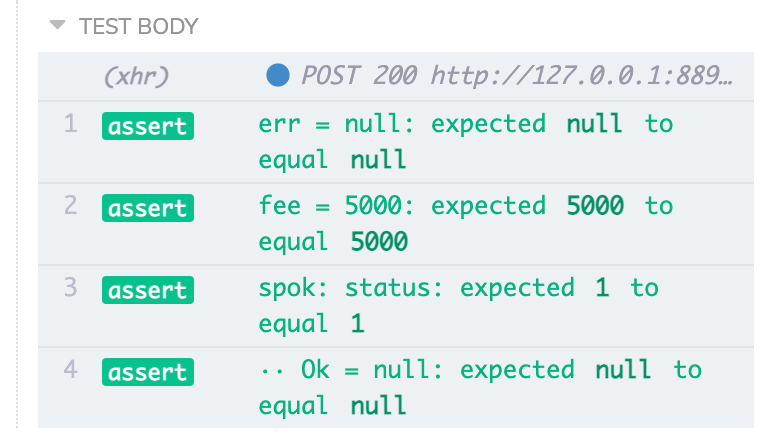
Spok can be used out of the box with expect, for instance when running tests with
cypress.io.
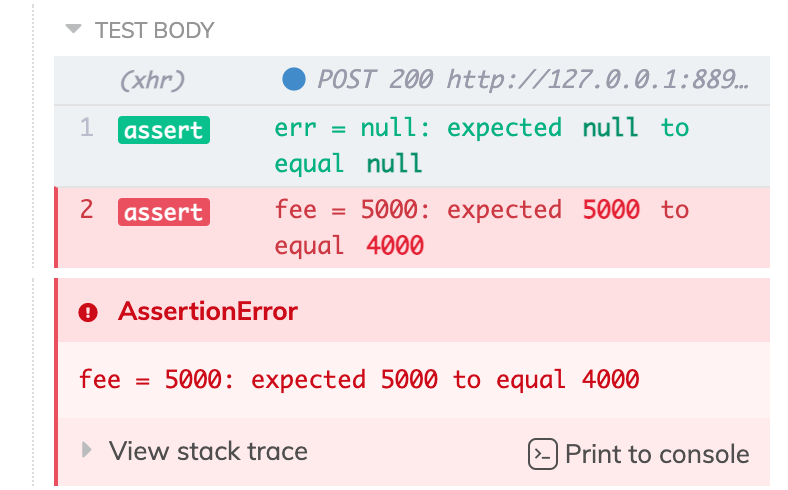
Simply create a custom assert function and pass it to spok. The main difference to running
tests with tape is that if a single property in the compared object doesn't match the test
fails immediately.
import spok from 'spok'const t = spok.adapters.chaiExpect(expect)
deepEqual works great for most cases, but in some cases you need more control, i.e.
values don't exactly match, but are in a given range
you want to provide a predicate to determine if a value is correct or not
you only want to check a subset of values contained in the object
Adjusting Print Details
By default spok prints the specification that a particular assertion satisified, i.e. satisfies: spok.range(2, 4).
You can turn that off via spok.printSpec = false.
On the other hand if you want more details about the satisified spec do spok.printDescription = true instead to get
spok to print things like satisfies: spok.range(2, 4) 2 <= value <= 4.
Specs and descriptions are printed in gray so you can focus on the actual values of the test output.
spok provides a few common specification functions. However you can write your own functions as well, just return true
if specification was satisfied and false if not (see example above).
If you write a specification function that would be useful to others please add it along with a test and provide a PR.
spok.* comparison function names are derived from bash comparison
operators to make them easier to remember.
Checks the given specifications against the object.
When the tests are run the actual values are printed to verify visually while
each provided specification is validated and a test failure caused if one of them fails.
Parameters
tObject which has assertion functions equal and deepEqual (to compare objects) - use
tap, tape, assert, Node.js TestContext or any other library that has those and thus is compatible
objObject the object to verify the specifications against
Version of spok that is less strict about the relation of the
specification type, namely it allows overriding the type manually or
derives it from the supplied parameter.
Use ONLY when you cannot adjust the types, so plain spok works.
spok.range
Specififies that the given number is within the given range, i.e. min<= x <=max.
var spec = { x: spok.range(1, 2) // specifies that x should be >=1 and <=2}