contents
tailwind-rn 
Use Tailwind in React Native projects
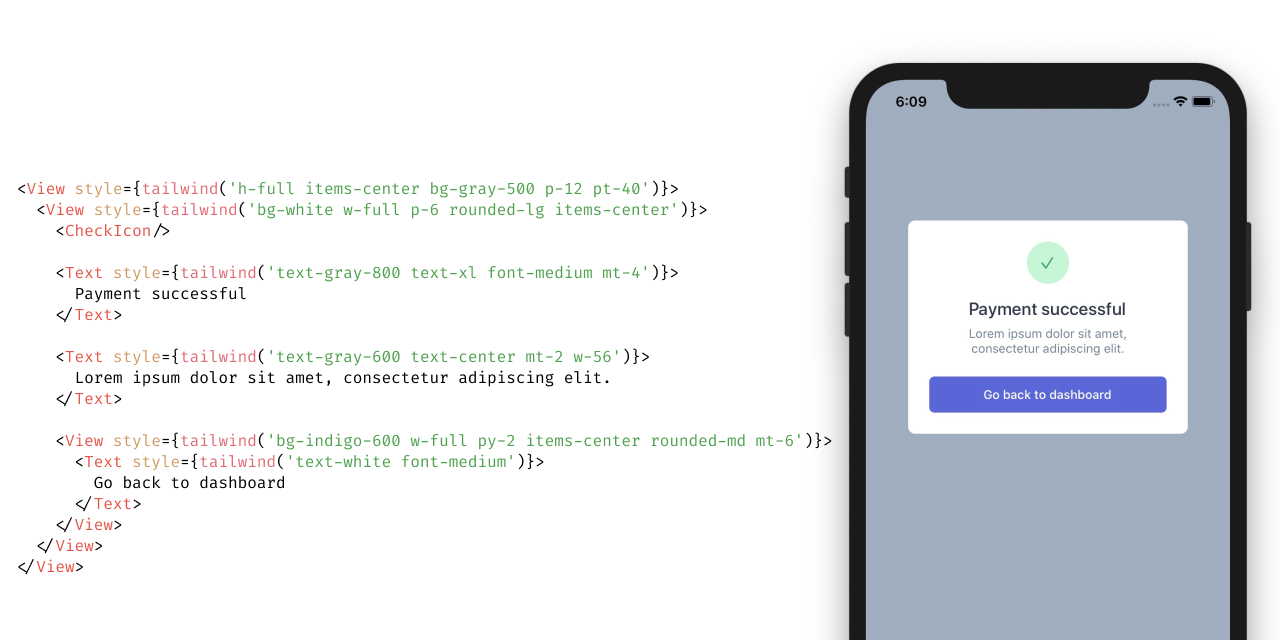
All styles are generated directly from Tailwind's output, so they're always up-to-date.
- JIT mode
- Responsive breakpoints (e.g.
sm,md,lg) - Dark mode
- Custom configuration
package
Use Tailwind CSS in React Native projects
npm install tailwind-rnGitHub-flavored package documentation.
Across all versions.
Download trend unavailable.
Runtime metadata.
Tagged topics.
Use Tailwind in React Native projects
All styles are generated directly from Tailwind's output, so they're always up-to-date.
sm, md, lg)$ npm install tailwind-rnRun the following command to automatically add tailwind-rn to your React Native project:
$ npx setup-tailwind-rnIt will do most of the setup for you, but you'll have to follow a few more instructions from setup-tailwind-rn to finish the process.
tailwind-rn.$ npm install tailwind-rnconcurrently.$ npm install --save-dev tailwindcss postcss concurrently$ npx tailwindcss init
$ echo '@tailwind utilities;' > input.cssThese commands will create the following files:
tailwind-rn to fail.Disable unsupported utilities by adding this line to your tailwind.config.js:
module.exports = {
+	corePlugins: require('tailwind-rn/unsupported-core-plugins')
};Make sure to configure content part of the config in tailwind.config.js to point to your JavaScript files to speed up compilation.
{
	"scripts": {
+		"build:tailwind": "tailwindcss --input input.css --output tailwind.css --no-autoprefixer && tailwind-rn",
+		"dev:tailwind": "concurrently \"tailwindcss --input input.css --output tailwind.css --no-autoprefixer --watch\" \"tailwind-rn --watch\""
	}
}$ npm run dev:tailwindAfter styles are built, you'll see two more files:
tailwind-rn can understand it.TailwindProvider and tailwind.json in the root of your app and wrap the root of your app with it:import {TailwindProvider} from 'tailwind-rn';
import utilities from './tailwind.json';
const App = () => (
<TailwindProvider utilities={utilities}>
<MyComponent />
</TailwindProvider>
);
export default App;import {useTailwind} from 'tailwind-rn';
const MyComponent = () => {
const tailwind = useTailwind();
return <Text style={tailwind('text-blue-600')}>Hello world</Text>;
};Use useTailwind React hook and apply any of the supported utilities from Tailwind in your React Native views.
import React from 'react';
import {SafeAreaView, View, Text} from 'react-native';
import {useTailwind} from 'tailwind-rn';
const Hello = () => {
const tailwind = useTailwind();
return (
<SafeAreaView style={tailwind('h-full')}>
<View style={tailwind('pt-12 items-center')}>
<View style={tailwind('bg-blue-200 px-3 py-1 rounded-full')}>
<Text style={tailwind('text-blue-800 font-semibold')}>
Hello Tailwind
</Text>
</View>
</View>
</SafeAreaView>
);
};
export default Hello;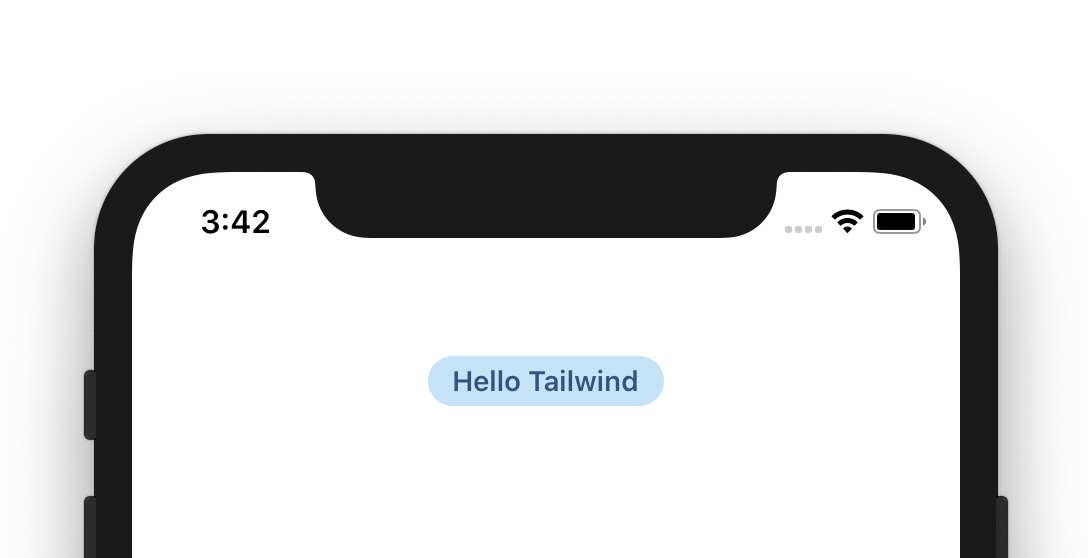
tailwind function returns a simple object with styles, which can be used in any React Native view, such as <View>, <Text> and others.
tailwind('pt-12 items-center');
//=> {
// paddingTop: 48,
// alignItems: 'center'
// }$ tailwind-rn --help
Use Tailwind CSS in React Native projects
Usage
$ tailwind-rn [options]
Options
-i, --input Path to CSS file that Tailwind generates (default: tailwind.css)
-o, --output Output file (default: tailwind.json)
-w, --watch Watch for changes and rebuild as needed
Run tailwind-rn CLI to transform the CSS generated by Tailwind into a JSON file that can be consumed by TailwindProvider. Add --watch flag to watch for changes and build styles continuously, which is useful for development.
Type: object
Parsed JSON object of styles generated by tailwind-rn CLI stored in tailwind.json by default.
import {TailwindProvider} from 'tailwind-rn';
import utilities from './tailwind.json';
const App = () => (
<TailwindProvider utilities={utilities}>
<MyComponent />
</TailwindProvider>
);Type: string
Override the default color scheme. Possible values are light or dark.
import {TailwindProvider} from 'tailwind-rn';
import utilities from './tailwind.json';
const App = () => (
<TailwindProvider utilities={utilities} colorScheme="dark">
<MyComponent />
</TailwindProvider>
);React hook, which returns a tailwind function, that accepts a string with class names. This function returns an object of styles, which can be applied to a React Native view via style property.
Note: Add TailwindProvider above the component where you're using this hook.
import {useTailwind} from 'tailwind-rn';

const MyComponent = () => {
	const tailwind = useTailwind();

	return <Text style={tailwind('text-blue-600')}>Hello world</Text>;
};hidden and flex)overflow-hidden, overflow-scroll and overflow-visible)relative and absolute)*-auto)z-auto)w-auto and w-screen)h-auto and h-screen)min-h-screen)max-h-full)tailwind.config.js)oldstyle-nums, lining-nums, tabular-nums and proportional-nums)text-lg)text-current)decoration-wavy)border-current)Estimated unpacked size across 18 packages.
1.1 MB
Includes dependencies.
7 direct · 4 outdated
^3.0.0
3.0.0
^7.0.1
14.1.0
^3.5.2
6.0.0
^1.9.0
2.1.4
^0.1.2
0.1.2
^3.0.0
3.2.0
100.1.0