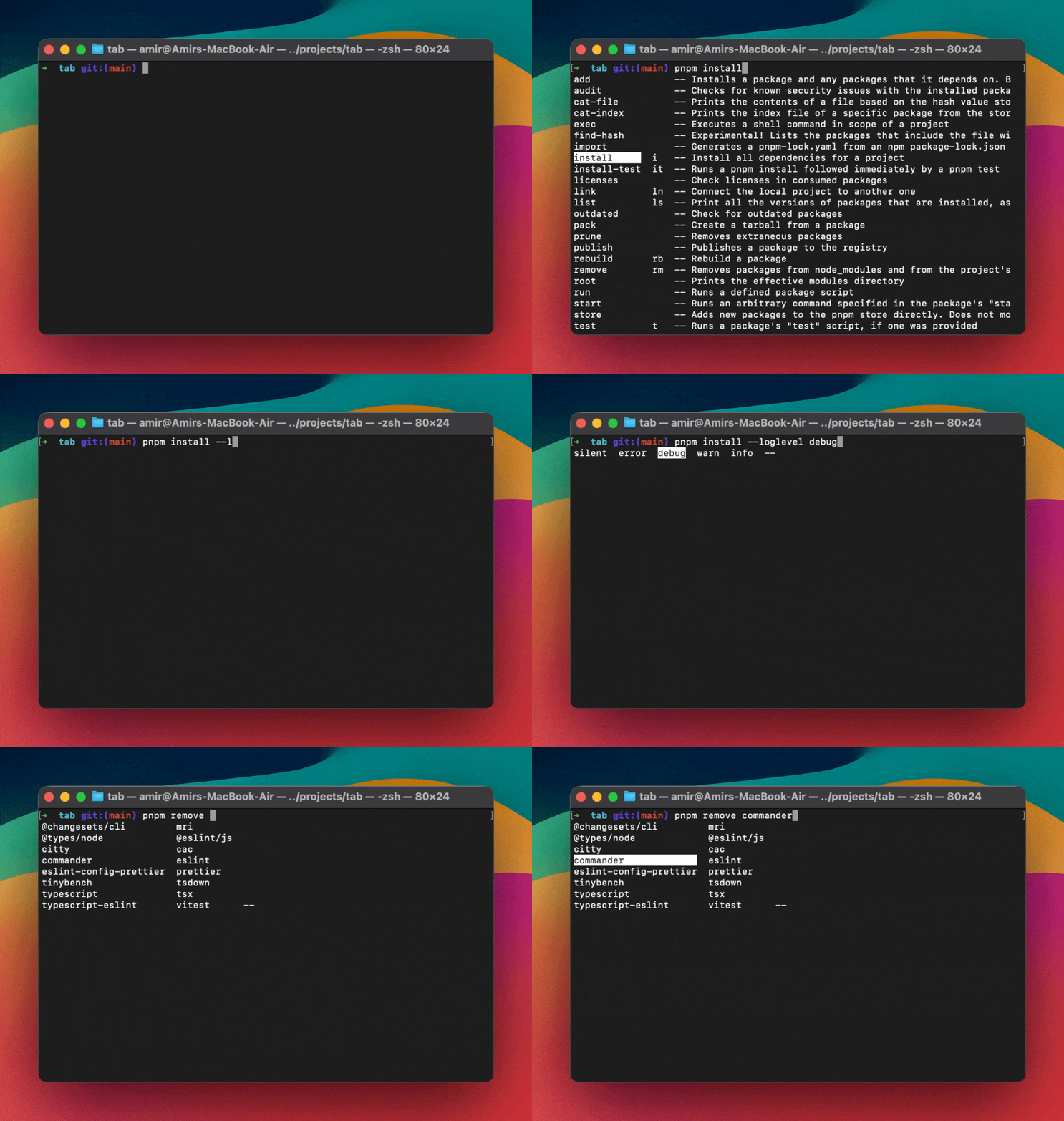
Shell autocompletions are largely missing in the JavaScript CLI ecosystem. tab provides a simple API for adding autocompletions to any JavaScript CLI tool.
Additionally, tab supports autocompletions for pnpm, npm, yarn, and bun.
Tab has already been adopted by major tools and CLI frameworks, including:
As CLI tooling authors, if we can spare our users a second or two by not checking documentation or writing the -h flag, we're doing them a huge favor. The unconscious mind loves hitting the [TAB] key and always expects feedback. When nothing happens, it breaks the user's flow - a frustration apparent across the whole JavaScript CLI tooling ecosystem.
tab solves this complexity by providing autocompletions that work consistently across zsh, bash, fish, and powershell.
Installation
For Package Manager Completions
Note: Global install is recommended
npm install -g @bomb.sh/tab
Then enable completions permanently:
# For zshecho 'source <(tab pnpm zsh)' >> ~/.zshrcsource ~/.zshrc# For bashecho 'source <(tab pnpm bash)' >> ~/.bashrcsource ~/.bashrc# The same can be done for other shells!
Generated completion scripts invoke your CLI by its program name (e.g. my-cli),
which the shell resolves via PATH, an alias, or a shell function. During local
development your CLI usually isn't installed on PATH, so define a session-scoped
shell function that runs it from source, then source the completions. No build,
no install, and no PATH changes are needed — the function disappears when you
close the terminal.
Replace my-cli with your program name and adjust the source path if needed.
Package manager completion does more than complete the package manager's own flags — it also delegates to CLIs installed as local project dependencies. If a CLI implements tab's completion protocol (directly or via a framework adapter), it becomes completable through your package manager without being on your PATH and without installing its completion script separately:
pnpm exec my-cli <TAB> # completes my-cli's subcommands and flagspnpm dlx my-cli <TAB>pnpm my-cli <TAB> # the bare form works too
Under the hood, tab strips the package-manager wrapper (exec, x, run, dlx), detects whether the target CLI supports completion, and forwards the request to it — falling back to running the CLI through the package manager (e.g. pnpm my-cli complete -- …) so locally-installed binaries resolve. The same works for npm exec, yarn, and bun x.
Note: Completion is registered against the package-manager binary (npm, pnpm, yarn, bun). npx and bunx are separate commands with no completion of their own, so npx my-cli <TAB> / bunx my-cli <TAB> won't complete — use npm exec my-cli / bun x my-cli instead.
Framework Adapters
tab provides adapters for popular JavaScript CLI frameworks.
import { Command } from 'commander';import tab from '@bomb.sh/tab/commander';const program = new Command('my-cli');program.version('1.0.0');// Define commandsprogram .command('serve') .description('Start the server') .option('-p, --port <number>', 'port to use', '3000') .option('-H, --host <host>', 'host to use', 'localhost') .action((options) => { console.log('Starting server...'); });// Initialize tab completionsconst completion = tab(program);// Add custom completionsconst serveCommand = completion.commands.get('serve');const portOption = serveCommand?.options.get('port');if (portOption) { portOption.handler = (complete) => { complete('3000', 'Default port'); complete('8080', 'Alternative port'); };}program.parse();
The Commander integration supports customising the command name to generate the shell completion script. The default is complete. If you use a custom name
like completion then it will be visible in the help as completion <shell>, while the runtime suggestions will be hiddden (complete -- [args...]).
You'll need to use your custom command when following examples on this page to generate the shell completion script.
We welcome contributions! tab's architecture makes it easy to add support for new package managers or CLI frameworks.
Acknowledgments
tab was inspired by the great Cobra project, which set the standard for CLI tooling in the Go ecosystem.
Adoption Support
We want to make it as easy as possible for the JS ecosystem to enjoy great autocompletions.
We at thundraa would be happy to help any open source CLI utility adopt tab.
If you maintain a CLI and would like autocompletions set up for your users, just drop the details in our Adopting tab discussion.
We’ll gladly help and even open a PR to get you started.