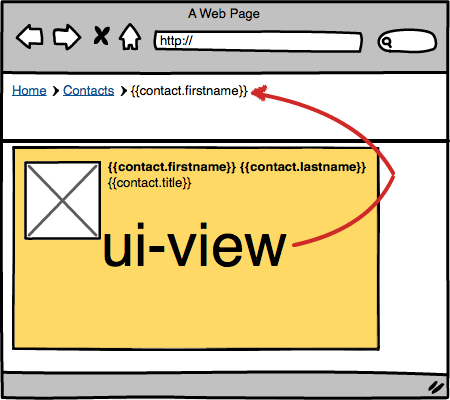
Angular.JS structures your data in nested scopes. Which is great, except when page structure doesn’t work like that and you need the inner data on a much higher level (say in the navigation). With import-scope, you can import the scope of a lower-level ui-view somewhere higher up.
Link to a named ui-view somewhere to import the scope:
<div id="header" import-scope="content@app"> <h1>{{title || "No title"}}</h2></div>
Note: You need to specify the full name, which is of the form viewname@statename.
License
(The MIT License)Copyright (C) 2014 by Ruben Vermeersch <ruben@rocketeer.be>Permission is hereby granted, free of charge, to any person obtaining a copyof this software and associated documentation files (the "Software"), to dealin the Software without restriction, including without limitation the rightsto use, copy, modify, merge, publish, distribute, sublicense, and/or sellcopies of the Software, and to permit persons to whom the Software isfurnished to do so, subject to the following conditions:The above copyright notice and this permission notice shall be included inall copies or substantial portions of the Software.THE SOFTWARE IS PROVIDED "AS IS", WITHOUT WARRANTY OF ANY KIND, EXPRESS ORIMPLIED, INCLUDING BUT NOT LIMITED TO THE WARRANTIES OF MERCHANTABILITY,FITNESS FOR A PARTICULAR PURPOSE AND NONINFRINGEMENT. IN NO EVENT SHALL THEAUTHORS OR COPYRIGHT HOLDERS BE LIABLE FOR ANY CLAIM, DAMAGES OR OTHERLIABILITY, WHETHER IN AN ACTION OF CONTRACT, TORT OR OTHERWISE, ARISING FROM,OUT OF OR IN CONNECTION WITH THE SOFTWARE OR THE USE OR OTHER DEALINGS INTHE SOFTWARE.