Full customizable output format (various placeholders are available)
Single progressbar mode
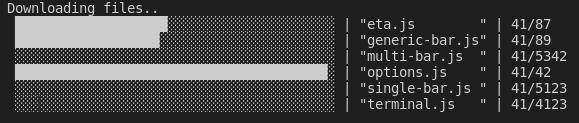
Multi progessbar mode
Custom Bar Characters
FPS limiter
ETA calculation based on elapsed time
Custom Tokens to display additional data (payload) within the bar
TTY and NOTTY mode
No callbacks required - designed as pure, external controlled UI widget
Works in Asynchronous and Synchronous tasks
Preset/Theme support
Custom bar formatters (via callback)
Logging during multibar operation
Usage
Multiple examples are available e.g. example.js - just try it $ node example.js
const cliProgress = require('cli-progress');// create a new progress bar instance and use shades_classic themeconst bar1 = new cliProgress.SingleBar({}, cliProgress.Presets.shades_classic);// start the progress bar with a total value of 200 and start value of 0bar1.start(200, 0);// update the current value in your application..bar1.update(100);// stop the progress barbar1.stop();
Single Bar Mode
Example
const cliProgress = require('cli-progress');// note: you have to install this dependency manually since it's not required by cli-progressconst colors = require('ansi-colors');// create new progress barconst b1 = new cliProgress.SingleBar({ format: 'CLI Progress |' + colors.cyan('{bar}') + '| {percentage}% || {value}/{total} Chunks || Speed: {speed}', barCompleteChar: '\u2588', barIncompleteChar: '\u2591', hideCursor: true});// initialize the bar - defining payload token "speed" with the default value "N/A"b1.start(200, 0, { speed: "N/A"});// update valuesb1.increment();b1.update(20);// stop the barb1.stop();
Constructor
Initialize a new Progress bar. An instance can be used multiple times! it's not required to re-create it!
const cliProgress = require('cli-progress');const <instance> = new cliProgress.SingleBar(options:object [, preset:object]);
Options
::start()
Starts the progress bar and set the total and initial value
Sets the current progress value and optionally the payload with values of custom tokens as a second parameter. To update payload only, set currentValue to null.
Initialize a new multiprogress container. Bars need to be added. The options/presets are used for each single bar!
const cliProgress = require('cli-progress');const <instance> = new cliProgress.MultiBar(options:object [, preset:object]);
::create()
Adds a new progress bar to the container and starts the bar. Returns regular SingleBar object which can be individually controlled.
Additional barOptions can be passed directly to the generic-bar to override the global options for a single bar instance. This can be useful to change the appearance of a single bar object. But be patient: this should only be used to override formats - DON'T try to set other global options like the terminal, synchronous flags, etc..
format (type:string|function) - progress bar output format @see format section
fps (type:float) - the maximum update rate (default: 10)
stream (type:stream) - output stream to use (default: process.stderr)
stopOnComplete (type:boolean) - automatically call stop() when the value reaches the total (default: false)
clearOnComplete (type:boolean) - clear the progress bar on complete / stop() call (default: false)
barsize (type:int) - the length of the progress bar in chars (default: 40)
align (type:char) - position of the progress bar - 'left' (default), 'right' or 'center'
barCompleteChar (type:char) - character to use as "complete" indicator in the bar (default: "=")
barIncompleteChar (type:char) - character to use as "incomplete" indicator in the bar (default: "-")
hideCursor (type:boolean) - hide the cursor during progress operation; restored on complete (default: false) - pass null to keep terminal settings
linewrap (type:boolean) - disable line wrapping (default: false) - pass null to keep terminal settings; pass true to add linebreaks automatically (not recommended)
gracefulExit (type:boolean) - stop the bars in case of SIGINT or SIGTERM - this restores most cursor settings before exiting (default: true)
etaBuffer (type:int) - number of updates with which to calculate the eta; higher numbers give a more stable eta (default: 10)
etaAsynchronousUpdate (type:boolean) - trigger an eta calculation update during asynchronous rendering trigger using the current value - should only be used for long running processes in conjunction with lof fps values and large etaBuffer (default: false)
synchronousUpdate (type:boolean) - trigger redraw during update() in case threshold time x2 is exceeded (default: true) - limited to single bar usage
noTTYOutput (type:boolean) - enable scheduled output to notty streams - e.g. redirect to files (default: false)
notTTYSchedule (type:int) - set the output schedule/interval for notty output in ms (default: 2000ms)
emptyOnZero (type:boolean) - display progress bars with 'total' of zero(0) as empty, not full (default: false)
forceRedraw (type:boolean) - trigger redraw on every frame even if progress remains the same; can be useful if progress bar gets overwritten by other concurrent writes to the terminal (default: false)
barGlue (type:string) - a "glue" string between the complete and incomplete bar elements used to insert ascii control sequences for colorization (default: empty) - Note: in case you add visible "glue" characters the barsize will be increased by the length of the glue!
autopadding (type: boolean) - add padding chars to formatted time and percentage to force fixed width (default: false) - Note: handled standard format functions!
autopaddingChar (type: string) - the character sequence used for autopadding (default: " ") - Note: due to performance optimizations this value requires a length of 3 identical chars
formatBar (type: function) - a custom bar formatter function which renders the bar-element (default: format-bar.js)
formatTime (type: function) - a custom timer formatter function which renders the formatted time elements like eta_formatted and duration-formatted (default: format-time.js)
formatValue (type: function) - a custom value formatter function which renders all other values (default: format-value.js)
Events
The classes extends EventEmitter which allows you to hook into different events.
See event docs for detailed information + examples.
Bar Formatting
The progressbar can be customized by using the following build-in placeholders. They can be combined in any order.
{bar} - the progress bar, customizable by the options barsize, barCompleteString and barIncompleteString
{percentage} - the current progress in percent (0-100)
{total} - the end value
{value} - the current value set by last update() call
{eta} - expected time of accomplishment in seconds (limmited to 115days, otherwise INF is displayed)
{duration} - elapsed time in seconds
{eta_formatted} - expected time of accomplishment formatted into appropriate units
{duration_formatted} - elapsed time formatted into appropriate units
{<payloadKeyName>} - the payload value identified by its key
Instead of a "static" format string it is also possible to pass a custom callback function as formatter.
For a full example (including params) take a look on lib/formatter.js
Example 1
function formatter(options, params, payload){ // bar grows dynamically by current progress - no whitespaces are added const bar = options.barCompleteString.substr(0, Math.round(params.progress*options.barsize)); // end value reached ? // change color to green when finished if (params.value >= params.total){ return '# ' + colors.grey(payload.task) + ' ' + colors.green(params.value + '/' + params.total) + ' --[' + bar + ']-- '; }else{ return '# ' + payload.task + ' ' + colors.yellow(params.value + '/' + params.total) + ' --[' + bar + ']-- '; }}const opt = { format: formatter}
// change the progress characters// set fps limit to 5// change the output stream and barsizeconst bar = new _progress.Bar({ barCompleteChar: '#', barIncompleteChar: '.', fps: 5, stream: process.stdout, barsize: 65, position: 'center'});
Example 2 - Change Styles defined by Preset
// uee shades preset// change the barsizeconst bar = new _progress.Bar({ barsize: 65, position: 'right'}, _progress.Presets.shades_grey);
Example 3 - Custom Payload
The payload object keys should only contain keys matching standard \w+ regex!
// create new progress bar with custom token "speed"const bar = new _progress.Bar({ format: 'progress [{bar}] {percentage}% | ETA: {eta}s | {value}/{total} | Speed: {speed} kbit'});// initialize the bar - set payload token "speed" with the default value "N/A"bar.start(200, 0, { speed: "N/A"});// some code/update loop// ...// update bar value. set custom token "speed" to 125bar.update(5, { speed: '125'});// process finishedbar.stop();
const myPreset = require('./myPreset.js');const bar = new _progress.Bar({ barsize: 65}, myPreset);
Presets/Themes
Need a more modern appearance ? cli-progress supports predefined themes via presets. You are welcome to add your custom one :)
But keep in mind that a lot of the "special-chars" rely on Unicode - it might not work as expected on legacy systems.
Default Presets
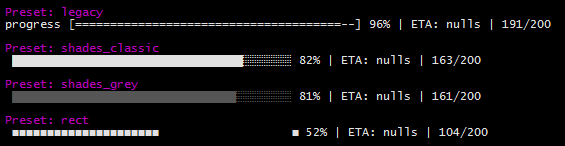
The following presets are included by default
legacy - Styles as of cli-progress v1.3.0
shades-classic - Unicode background shades are used for the bar
shades-grey - Unicode background shades with grey bar
rect - Unicode Rectangles
Compatibility
cli-progress is designed for linux/macOS/container applications which mostly providing standard compliant tty terminals/shells. In non-tty mode it is suitable to be used with logging daemons (cyclic output).
It also works with PowerShell on Windows 10 - the legacy command prompt on outdated Windows versions won't work as expected and is not supported!