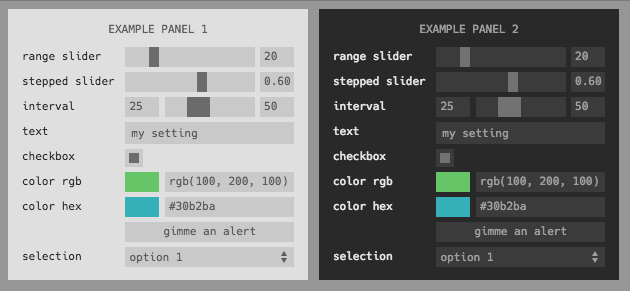
Embeddable panel of inputs for adding parameter selection to your app or visualization. Modern and minimalist design. Fully encapsulated module including JS and CSS. Can easily be added to any app or page. Heavily inspired by dat-gui, but streamlined, simplified, and written as a npm module for use with browserify.
The first argument is a list of inputs. Each one must have a type and label property, and can have an initial property with an initial value. For example,
Each type must be one of range • input • checkbox • color • interval • select. Each label must be unique.
Some types have additional properties:
Inputs of type range can specify a min, max, and step (or integer steps). Scale can be either 'linear' (default) or 'log'. If a log scale, the sign of min, max, and initial must be the same and only steps is permitted (since the step size is not constant on a log scale).
Inputs of type color can specify a format as either rgb • hex • array
Inputs of type button can specify an action callback. Button inputs are not reflected in the state and do not trigger an 'input' event.
Inputs of type interval obey the same semantics as range inputs, except the input and ouput is a two-element array corresponding to the low/high bounds, e.g. initial: [1, 7.5].
Inputs of type select can specify a list of options, either as an Array (in which case the value is the same as the option text) or as an object containing key/value pairs (in which case the key/value pair maps to value value/label pairs).
Inputs of type multibox can specify a number of checkboxes, either by providing a count or a list of names from which the number will be inferred, in which case the color of each box and a text name can also be provided as lists colors and names
The following optional parameters can also be passed as opts
root root element to which to append the panel
theme can specify light • dark or provide an object (see themes.js for format)
title a title to add to the top of the panel
width width of panel in pixels
position where to place the panel as top-left • top-right • bottom-left • bottom-right, if undefined will just use relative positioning
panel.on('input', cb(data))
This event is emitted every time any one of the inputs change. The callback argument data will contain the state of all inputs keyed by label such as: