Skip to content package
emphasize v5.0.0 ANSI syntax highlighting for the terminal
node any 3 deps esm types open source
overview readme
license MIT
deps 3
unpacked 32.7 kB
files 11
node any $ npm install emphasize@5.0.0n npmREADME GitHub-flavored package documentation.
downloads Across all versions.
Download trend unavailable.
compatibility Runtime metadata.
keywords Tagged topics.
syntax code ansi terminal highlight highlighting
install size Estimated unpacked size across 1 packages.
32.7 kB
Includes dependencies.
dependencies 3 direct dependencies.
versions Latest published Nov 1, 2023
maintainers Registry package owners.
ANSI syntax highlighting for the terminal.
Contents
What is this? This package wraps lowlight
When should I use this? This package is useful when you want to display code on a terminal.
Install This package is ESM only .
In Node.js (version 16+),
install with npm :
npm install emphasize copy import {all, common, createEmphasize} from 'https://esm.sh/emphasize@7' copy < script type = "module" > import {all, common, createEmphasize} from 'https://esm.sh/emphasize@7?bundle' </ script > copy
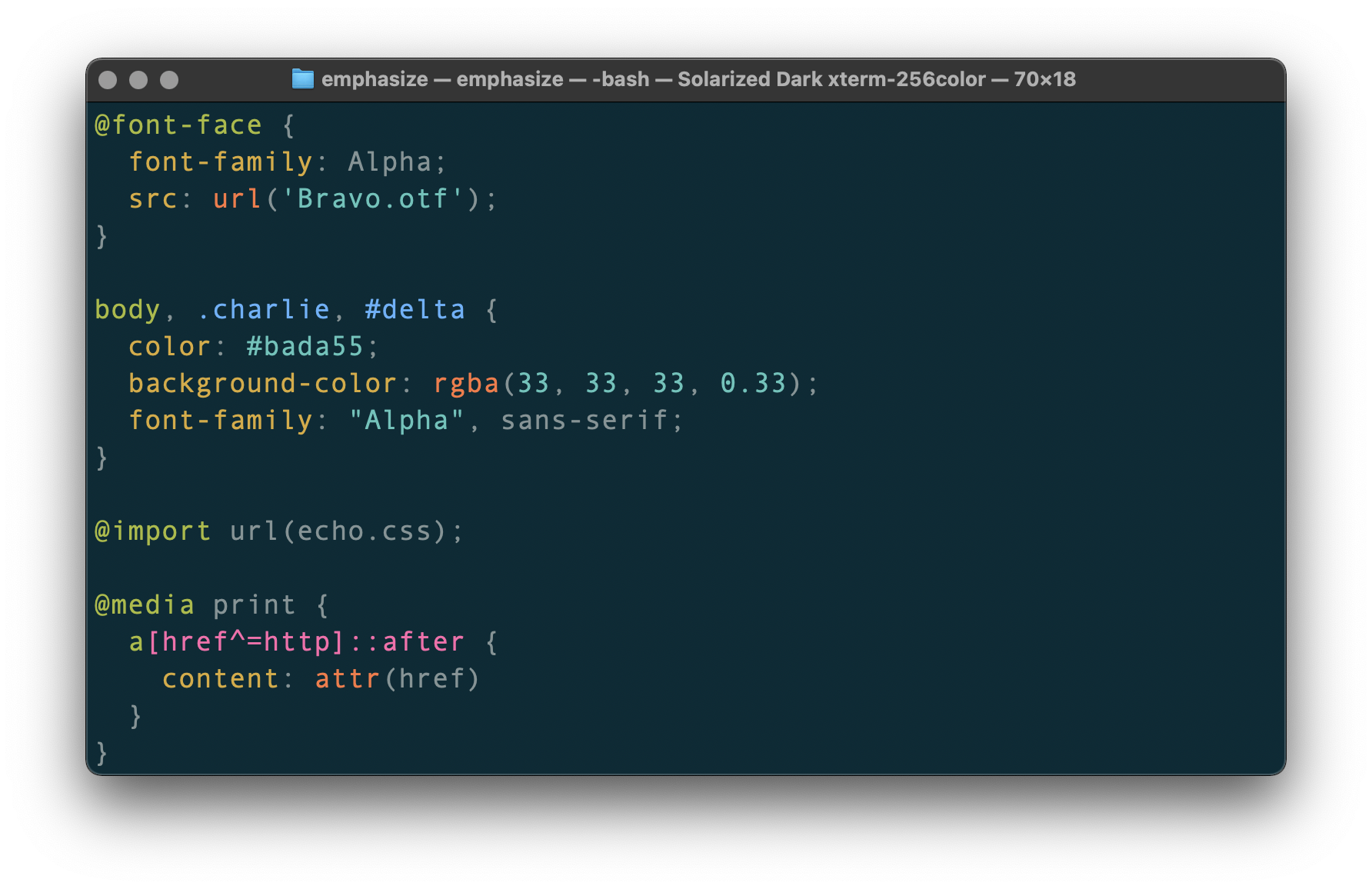
Use Say example.css looks as follows:
@font-face { font-family : Alpha ; src : url ( 'Bravo.otf' ) ; } body , .charlie , #delta { color : #bada55 ; background-color : rgba ( 33 , 33 , 33 , 0.33 ) ; font-family : "Alpha" , sans-serif ; } @import url (echo.css); @media print { a [href^= http ]::after { content : attr ( href ) } } copy …and example.js contains the following:
import fs from 'node:fs/promises' import {emphasize} from 'emphasize' const doc = String ( await fs. readFile ( 'example.css' )) const output = emphasize. highlightAuto (doc).value console. log (output) copy …now running node example.js yields:
\x1B[32m@font-face\x1B[39m {
  \x1B[33mfont-family\x1B[39m: Alpha;
  \x1B[33msrc\x1B[39m: \x1B[31murl\x1B[39m(\x1B[36m'Bravo.otf'\x1B[39m);
}

\x1B[32mbody\x1B[39m, \x1B[34m.charlie\x1B[39m, \x1B[34m#delta\x1B[39m {
  \x1B[33mcolor\x1B[39m: \x1B[36m#bada55\x1B[39m;
  \x1B[33mbackground-color\x1B[39m: \x1B[31mrgba\x1B[39m(\x1B[36m33\x1B[39m, \x1B[36m33\x1B[39m, \x1B[36m33\x1B[39m, \x1B[36m0.33\x1B[39m);
  \x1B[33mfont-family\x1B[39m: \x1B[36m"Alpha"\x1B[39m, sans-serif;
}

\x1B[32m@import\x1B[39m url(echo.css);

\x1B[32m@media\x1B[39m print {
  \x1B[32ma\x1B[39m\x1B[35m[href^=http]\x1B[39m\x1B[35m::after\x1B[39m {
    \x1B[33mcontent\x1B[39m: \x1B[31mattr\x1B[39m(href)
  }
}
copy
API
all
common
createEmphasize(grammars?)Create a emphasize instance.
Parameters
Returns
emphasize.highlight(language, value[, options])Highlight value (code) as language (name).
Parameters
language (string)
— programming language name value (string)
— code to highlightsheet (Sheet
Returns
emphasize.highlightAuto(value[, options])Highlight value (code) and guess its programming language.
Parameters
value (string)
— code to highlightoptions (AutoOptionsSheet
Returns
emphasize.listLanguages()List registered languages.
emphasize.register(grammars)
emphasize.registerAlias(aliases)
emphasize.registered(aliasOrLanguage)Check whether an alias or name is registered.
AutoOptionsConfiguration for highlightAuto (TypeScript type).
Fields
sheet (Sheetsubset (Array<string>, default: all registered languages)
— list of allowed languages
LanguageFnHighlight.js grammar (TypeScript type).
ResultResult (TypeScript type).
Fields
language (string or undefined)
— detected programming language.relevance (number or undefined)
— how sure lowlight is that the given code is in the languagevalue (string)
— highlighted code
SheetThe hljs- prefix must not be used in those classes.
The “descendant selector” (a space) is supported.
{ 'comment' : chalk.gray, 'meta meta-string' : chalk.cyan, 'meta keyword' : chalk.magenta, 'emphasis' : chalk.italic, 'strong' : chalk.bold, 'formula' : chalk.inverse } copy
Type type Sheet = Record < string , Style > copy
StyleColor something (TypeScript type).
Parameters
Returns
Compatibility This projects is compatible with maintained versions of Node.js.
When we cut a new major release,
we drop support for unmaintained versions of Node.
This means we try to keep the current release line,
emphasize@7,
compatible with Node.js 16.
Security
Contribute
License