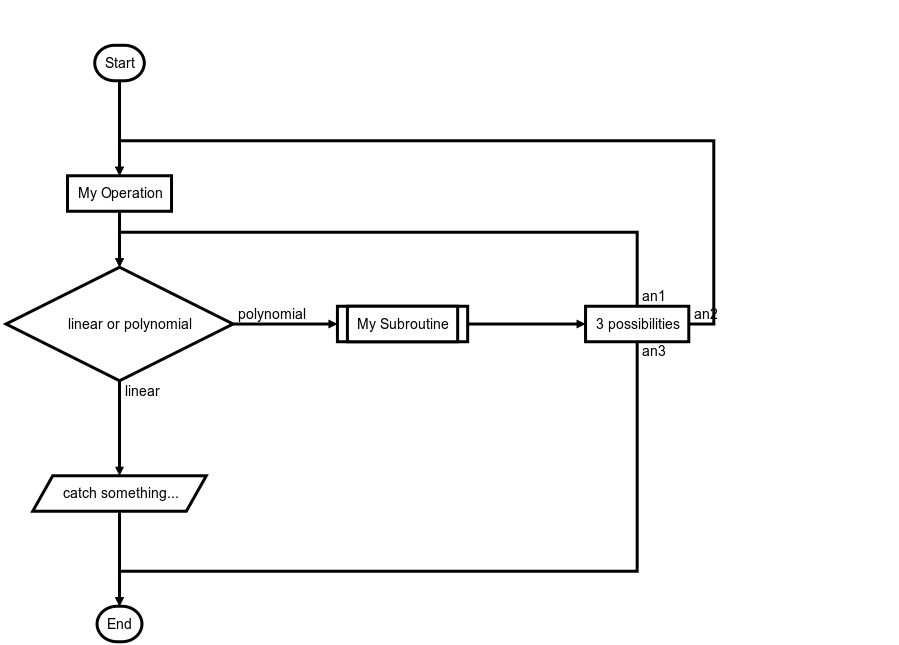
flowchart.js is a flowchart DSL and SVG render that runs in the browser and terminal.
Nodes and connections are defined separately so that nodes can be reused and connections can be quickly changed.
Fine grain changes to node and connection style can also be made right in the DSL.
nodeName defines the nodes variable name within the flowchart document.
nodeType defines what type the node is. See Node Types for more information.
nodeText is the text that will be inserted into the node. Newlines are allowed and will be reflected in the rendered node text.
flowstate is optional and uses the | operator that specifies extra styling for the node.
urlLink is optional and uses the :> operator to specify the url to link to.
Node Types
Defines the shape that the node will take.
start
Used as the first node where flows start from.
Default text is Start.
st=>start: start
end
Used as the last node where a flow ends.
Default text is End.
e=>end: end
operation
Indicates that an operation needs to happen in the flow.
op1=>operation: operation
inputoutput
Indicates that IO happens in a flow.
io=>inputoutput: inputoutput
input
Indicates that Input happens in a flow.
getInfo=>input: Input info
output
Indicates that Output happens in a flow.
printInfo=>output: Print info
subroutine
Indicates that a subroutine happens in the flow and that there should be another flowchart that documents this subroutine.
sub1=>subroutine: subroutine
condition
Allows for a conditional or logical statement to direct the flow into one of two paths.
cond=>condition: conditionYes or No?
parallel
Allows for multiple flows to happen simultaneously.
para=>parallel: parallel
Connections
Connections are defined in their own section below the node definitions.
The -> operator specifies a connection from one node to another like nodeVar1->nodeVar2->nodeVar3.
Not all nodes need to be specified in one string and can be separaged like so
The following directions are available and define the direction the connection will leave the node from. If there are more than one specifiers, it is always the last. All nodes have a default direction making this an optional specification. <direction> will be used to indicate that one of the following should be used in its place.
left
right
top
bottom
Node Specific Specifiers by Type
Each node variables has optional specifiers, like direction, and some have special specifiers depending on the node type that are defined below. Specifiers are added after the variable name in () and separated with , like nodeVar(spec1, spec2).
start
Optional direction
startVar(<direction>)->nextNode
end
No specifications because connections only go to the end node and do not leave from it.
st=>start: Start:>http://www.google.com[blank]e=>end:>http://www.google.comop1=>operation: My Operationsub1=>subroutine: My Subroutinecond=>condition: linear or polynomial :>http://www.google.comio=>inputoutput: catch something...para=>parallel: 3 possibilitiesst->op1->condcond(true@linear)->io->econd(false@polynomial)->sub1(right)sub1(right)->parapara(path1@an1, top)->condpara(path2@an2, right)->op1para(path3@an3, bottom)->e