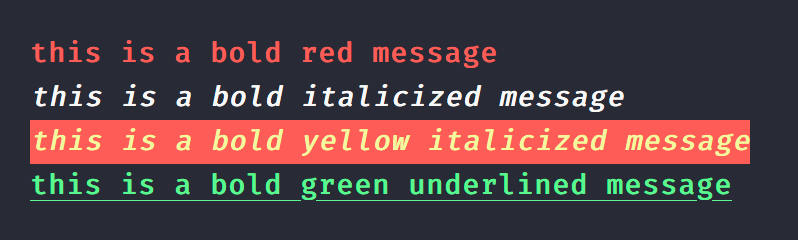
const { bold, green } = require('kleur');console.log(bold().red('this is a bold red message'));console.log(bold().italic('this is a bold italicized message'));console.log(bold().yellow().bgRed().italic('this is a bold yellow italicized message'));console.log(green().bold().underline('this is a bold green underlined message'));
Toggle color support as needed; kleur includes simple auto-detection which may not cover all cases.
Note: Both kleur and kleur/colors share the same detection logic.
import kleur from 'kleur';// manually disablekleur.enabled = false;// or use another library to detect supportkleur.enabled = require('color-support').level > 0;console.log(kleur.red('I will only be colored red if the terminal supports colors'));
Important: Colors will be disabled automatically in non TTY contexts. For example, spawning another process or piping output into another process will disable colorization automatically. To force colors in your piped output, you may do so with the FORCE_COLOR=1 environment variable:
When you only need a few colors, it doesn't make sense to import all of kleur because, as small as it is, kleur is not treeshakeable, and so most of its code will be doing nothing. In order to fix this, you can import from the kleur/colors submodule which fully supports tree-shaking.
The caveat with this approach is that color functions are not chainable~! Each function receives and colorizes its input. You may combine colors, backgrounds, and modifiers by nesting function calls within other functions.
// or: import * as kleur from 'kleur/colors';import { red, underline, bgWhite } from 'kleur/colors';red('red text');//~> kleur.red('red text');underline(red('red underlined text'));//~> kleur.underline().red('red underlined text');bgWhite(underline(red('red underlined text w/ white background')));//~> kleur.bgWhite().underline().red('red underlined text w/ white background');
The kleur/colors submodule also allows you to toggle color support, as needed.
It includes the same initial assumptions as kleur, in an attempt to have colors enabled by default.
Unlike kleur, this setting exists as kleur.$.enabled instead of kleur.enabled:
import * as kleur from 'kleur/colors';// or: import { $, red } from 'kleur/colors';// manually disabledkleur.$.enabled = false;// or use another library to detect supportkleur.$.enabled = require('color-support').level > 0;console.log(red('I will only be colored red if the terminal supports colors'));