Simple framework in Node,js for building small one page apps when you
don't need/want a more sophisticated framework.
I had built a number of small apps that I keep ruinning on my desktop and
extracted the common framework so that it could be more easily used for
future apps. Typically the apps have a small single page GUI.
The framework makes it easy to create the app where you only need to
focus on the app functionality and page layout while the framework
can handle the common requirements like the http server, tls support,
authentication etc.
The framework handles opening a pop-up page with the appropriate
size of the application GUI page. If you configure the browser to
allow javascript to close windows it will also close the window/page
from which the application is launched.
New You can now get native look and feel for micro-apps without
changing the app itself. It also removes the browser address bar
making the application window more compact. See the project
[micro-app-electron-launcher]
(https://github.com/mhdawson/micro-app-electron-launcher)
for details.
Examples
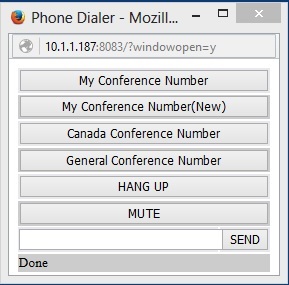
Examples of existing apps using the framework are shown in the following sections.
These existing micro-apps are a good starting point when you want
to create your first application based on the framework.
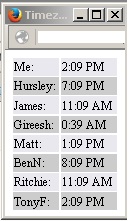
micro-app-timezones
Simple micro-app to keep track of the current time for people you work with.
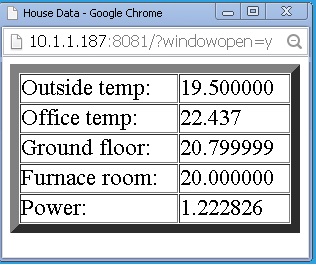
Micro app to display a home dashboard showing temperature, power usage and other data collected
from local sensors. The dashboard is updated in realtime using socket.io.
To build a micro-app using the framework you need to do the following:
create Node.js application called server.js
create html page template called page.html.template
create configuration file called config.json
create package.json so that micro-app can be published as an npm
Server.js
Server.js must define an object called "Sever" which must support
the following methods:
getDefaults() - must return an object which has fields which define
the default configuration values for the application. For example
returning { 'title': 'House Data' } sets the default title to
House Data. These values can be overridden by the conents of
config.json.
getTemplateReplacemnts() - must return an array of objects each
of which has a 'key' and 'value' field. Each instance of the key
in page.html.template will be substituted with the value provided.
startServer(server) - called when the configuration has been read in
and the application is ready to start. At this point Server.config
will have all of the configuration values for the application.
handleSupportingPages(request, response) - this can optionally be
provided to support returning page content other than the main page.
If this function handles a page it should return true and have
both written and ended the response. Otherwise its should return
false. This can be used to provide supporting scripts for the main
page.
The applicaiton can define its own substitutions in page.html.template
but in addition the framework uses/provides the following by default:
<URL_TYPE> - either http or https depending on wether tls is enabled.
This is provided by the framework, no need to provide in
getTemplateReplacements().
<TITLE> - title for the app page.
<PAGE_WIDTH> - width for the page opened for the application.
<PAGE_HEIGHT> - height for the page opened for the application.
In order to allow the micro-app to be started on its own (as opposed
to being started by the framework which will be supported in later
versions) the following should be at the end of server.js
if (require.main === module) {
  var path = require('path');
  var microAppFramework = require('micro-app-framework');
  microAppFramework(path.join(__dirname), Server);
}

module.exports = Server;
page.html.template
page.html.template provides the main page with the GUI for the applications.
It should use <TITLE> as the title so that uses the value from the
configuration files.
Other values can be used as required by the html/javascript defined for
the application.
For addtional connections (ex using socket.io) it should use <URL_TYPE> for
the connection type and something allong these lines for the connection
back to the application:
'<URL_TYPE<://' + window.location.host
config.json
config.json acts as the configuration file for the application. It can
include application specific values which server.js can read by accessing
the values in Server.config.
The following are supported by the framework itself:
serverPort - the port on which the server will listen (currently required
although a default will be supported in a later version).
title - the value that will be used for the <TITLE> substitution.
scrollBars - allow vertical scrollbars if content it bigger than
window
tls - if this value is the string "true" then the server will only
support connections using tls. In this case there must be a
cert.pem and key.pem which contain the key and certificate that
will be used by the server.
authenticate - if the value is the string "true" then basic authentication
will be required by the application and config.json must include
the field 'authInfo" as described below.
authInfo - object with the fields 'username', 'password' and 'realm'.
The password is a hashed value which can be created using the script
gen_password.js which is located in the lib directory for the
micro-app-framework.
The application can add any additional configuration values that will
be accessible through Server.config. In addition, if authentication is
enabled the value can be encrypted. In this case, the value can
be decrypted using Server.decryptConfigValue(value). The function
decryptConfigValue() will be added to the Server object after
authentication is complete and can be used in getTemplateReplacements().
If required the key/certificate can be created using a command along
these lines:
The script lib/gen_password.js can be used to generate the hashed password for
authInfo as follows:
node lib/gen_passwword.js mypassword
The script lib/enc_config_value.js can be used to encrypt a configuration value
as follows:
node lib/enc_config_value.js value mypassword
where value is the configuration value to be encrypted and mypassword must
be the same password configured for basic authentication.
The following are are also supported by the framework and useful for debugging:
useLaunchWindow - if set to the string "true" open the micro-app in the
launch window/tab as opposed to a pop-up. Useful for debugging so you can
more easily get the developer tools for the page.
closeLaunchWindow - if set to the string "true" and useLaunchWindow is
not set, then after opening the pop-up don't close the original launch
window/tab. Useful for debugging or when you just don't want the window
to be closed after launch.
package.json
package.json whould be as required for your application but it should include the
dependency on the lastest version of the micro-app-framework. For example:
and should include the following to support starting the micro-app with npm:
  "scripts": {
    "start": "node lib/server.js",
    "test": "echo \"Error: no test specified\" && exit 1"
  },
File layout
The framework expects the files to be layed out as follows:
package.json
lib/server.js
lib/page.html.template
lib/config.json
lib/key.pem (only needed if tls is enabled)
lib/cert.pem (only needed if tls is enabled)
and expects that the application will be started using:
npm start
in the root directory for the application (the directory with
package.json)
TODO
add option to configure the server, in particular need to be
able to limit it to using only the loopback address.