Node.js~0.10 is required. Type this at the command line:
npm install nopter --save-dev
Option Parsing
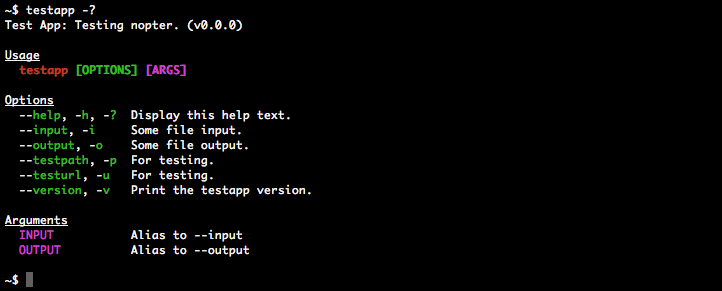
Options are defined with config() and serve as documentation for the help screen. The example below parses args and options from process.argv, leaving any remaining args not consumed by options as input()._remain.
Shorthand flags may be passed as a single arg, for example -abc is equivalent to -a -b -c. Multi-word options such as "--template-engine" are camel-cased, becoming input().templateEngine etc. unless overridden with option.rename.
Gets a (red) colored error message with a default "Error" prefix, but does not display/log it.
error can be an Error or String. If an Error, error.name will override the default prefix.
additional [optional] is a second, uncolored String sentence.
prefix [optional] overrides the default prefix.
error.notice(error, additional, prefix)
Gets an uncolored error message with a default "Notice" prefix, but does not display/log it.
See error.fatal for arguments info.
error.warn(error, additional, prefix)
Gets a (yellow) colored error message with a default "Warning" prefix, but does not display/log it.
See error.fatal for arguments info.
help()
Gets the help screen, but does not display/log it.
help.indent()
Gets the indent value for custom additions to the help screen.
input(args, slice)
Gets user input parsed by nopt.
nopter.input();nopter.input(process.argv, 2); // same as abovenopter.input("app --option value", 1);nopter.input(["--option","value"]);
args [optional] can be an Array or String. Default value is process.argv.
slice [optional] is a Number. See nopt docs. Unlike nopt, the default value of 2 only applies when args===process.argv; otherwise the default value is 0.
util.forceColors(value)
Forces colors in situations where they would normally be disabled such as a child_process and some CI (Continuous Integration) systems. Due to the singleton design of the color library, this value applies to all nopter instances. Colors are not forced by default.
value [optional] is a Boolean. If undefined, it will default to true.
util.readHelpFile(filepath)
Synchronously reads the contents of a text file and converts to LF line endings for cross-platform support. Useful in testing the output of help().
console.log( nopter.util.readHelpFile("path/to/file.txt") );//-> This is a text file.
filepath is a required String path, relative to the current module (like require("./")).
util.replaceColorVars(str)
Replace easy-to-read variables in a String with their ANSI counterparts. Useful in testing the output of help().
var str = "{{green}}This is a {{bold}}colored{{/bold}} sentence.{{/green}}";console.log( nopter.util.replaceColorVars(str) );//-> \u001b[32mThis is a \u001b[1mcolored\u001b[22m sentence.\u001b[39m
Remove all ANSI characters. Useful in testing the output of help().
var str = "\u001b[32mThis is a \u001b[1mcolored\u001b[22m sentence.\u001b[39m";console.log( nopter.util.stripColors(str) );//-> This is a colored sentence.
str is a required String.
Configuration
config.colors
Type: Array
Default value: ["red","green","magenta"]
The colors used in the help screen. Possible color values, [null,…] to disable a color and null to disable all colors.
config.description
Type: String
Default value: ""
The app description.
config.name
Type: String
Default value: "noname"
The app name used in the command line.
config.title
Type: String
Default value: config.name.toUpperCase()
The app title, which is sometimes slightly different from config.name.
config.version
Type: String
Default value: "0.0.0"
The app version.
config.options
Type: Object
Default value: {}
The command line options.


 Via the