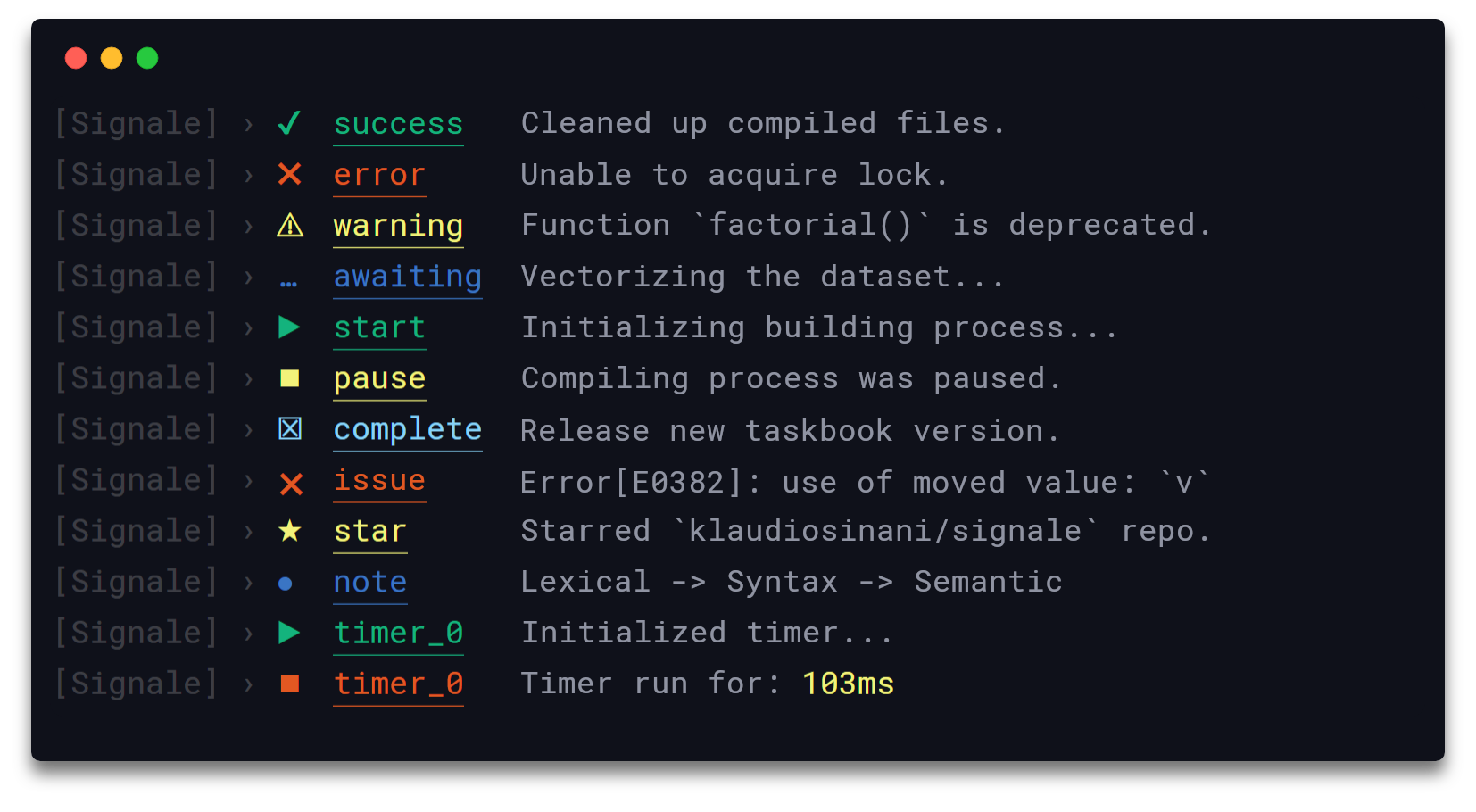
Hackable and configurable to the core, signale can be used for logging purposes, status reporting, as well as for handling the output rendering process of other node modules and applications.
The options object can hold any of the following attributes: disabled, interactive, stream, scope and types.
disabled
Type: Boolean
Default: false
Disables the logging functionality of all loggers belonging to the created instance.
interactive
Type: Boolean
Default: false
Switches all loggers belonging to the created instance into the interactive mode.
logLevel
Type: String
Default: 'info'
Sets the general logging level of the created instance. Can be 'info' - logs all messages of all loggers, 'timer' - logs only messages of time, timeEnd, debug, warn, error & fatal loggers, 'debug' - logs only messages of debug, warn, error & fatal loggers, 'warn' - logs only messages of warn, error & fatal loggers & 'error' - logs only messages of error & fatal loggers.
secrets
Type: (String|Number)[]
Default: []
An array holding secrets/sensitive-information to be removed from the body and metadata of to-be-logged messages and replaced with the default '[secure]' string.
stream
Type: stream.Writable|stream.Writable[]
Default: process.stdout
Destination to which the data is written, can be a single valid Writable stream or an array holding multiple valid Writable streams.
scope
Type: String|String[]
Name of the scope the logger is reporting from.
types
Type: Object
Holds the configuration of the custom and default loggers.
Additionally, the configuration object of each custom/default logger type, defined in the types option, can hold any of the following attributes: badge, label, color and logLevel.
badge
Type: String
The icon corresponding to the logger.
label
Type: String
The label used to identify the type of the logger.
color
Type: String
The color of the label, can be any of the foreground colors supported by chalk.
logLevel
Type: String
Default: 'info'
The log level corresponding to the logger. Messages originating from the logger are displayed only if the log level is greater or equal to the above described general logging level logLevel of the Signale instance.
Scoped Loggers
To create a scoped logger from scratch, define the scope field inside the options object and pass it as argument to a new signale instance.
const {Signale} = require('signale');const options = { scope: 'global scope'};const global = new Signale(options);global.success('Successful Operation');
To create a scoped logger based on an already existing one, use the scope() function, which will return a new signale instance, inheriting all custom loggers, timers, streams, configuration, interactive mode & disabled statuses from the initial one.
const signale = require('signale');const global = signale.scope('global scope');global.success('Hello from the global scope');function foo() { const outer = global.scope('outer', 'scope'); outer.success('Hello from the outer scope'); setTimeout(() => { const inner = outer.scope('inner', 'scope'); inner.success('Hello from the inner scope');
Interactive Loggers
To initialize an interactive logger, create a new signale instance with the interactive attribute set to true. While into the interactive mode, previously logged messages originating from an interactive logger, will be overridden only by new ones originating from the same or a different interactive logger. Note that regular messages originating from regular loggers are not overridden by the interactive ones.
const {Signale} = require('signale');const interactive = new Signale({interactive: true, scope: 'interactive'});interactive.await('[%d/4] - Process A', 1);setTimeout(() => { interactive.success('[%d/4] - Process A', 2); setTimeout(() => { interactive.await('[%d/4] - Process B', 3); setTimeout(() => { interactive.error('[%d/4] - Process B', 4); setTimeout
Writable Streams
By default, all signale instances log their messages to the process.stdout stream. This can be modified, to match your own preference, through the stream property, where you can define a single or multiple valid Writable streams, which will be used by all logger types to log your data. Additionally, it is possible to define one or more Writable streams exclusively for a specific logger type, thus write data independently from the rest logger types.
const {Signale} = require('signale');const options = { stream: process.stderr, // All loggers will now write to `process.stderr` types: { error: { // Only `error` will write to both `process.stdout` & `process.stderr` stream: [process.stdout, process.stderr] } }};const signale = new Signale(options);signale.success('Message will appear on `process.stderr`');signale.error('Message will appear on both `process.stdout` & `process.stderr`');
Secrets Filtering
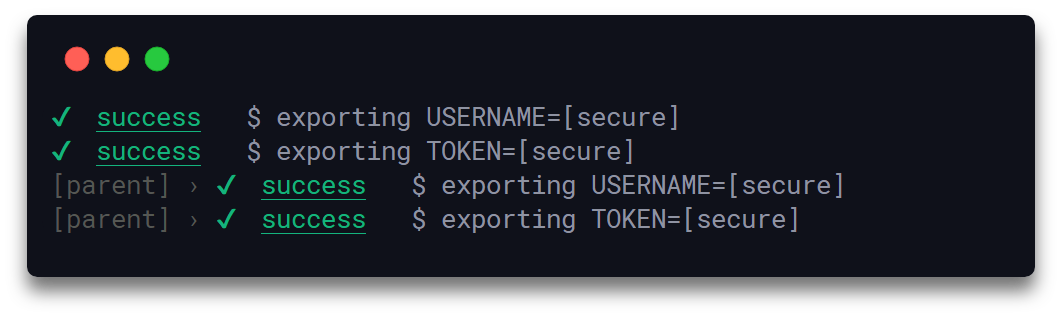
By utilizing the secrets option, secrets and other sensitive information can be filtered out from the body as well as the metadata, i.e. scope names etc, of to-be-logged messages. The option is part of the configuration object passed to a Signale instance on its initialization, and is of type Array<String|Number>. The array can hold multiple secrets, all of which are removed, if present, from the to-be-logged messages and are replaced with the default '[secure]' string. Additionally, when the unary signale.scope(name) function is used, the returned Signale instance inherits all the secrets belonging to its parent. The secrets checking process is performed in a case-sensitive manner. Also, the unary signale.addSecrets() and the nullary signale.clearSecrets() functions are available through the API for adding and clearing secrets respectively.
It is critical and highly recommended to not type directly secrets in your code, thus the following example serves only as a simple & easily reproducible usage demonstration.
const {Signale} = require('signale');// In reality secrets could be securely fetched/decrypted through a dedicated API const [USERNAME, TOKEN] = ['klaussinani', 'token'];const logger1 = new Signale({ secrets: [USERNAME, TOKEN]});logger1.log('$ exporting USERNAME=%s', USERNAME);logger1.log('$ exporting TOKEN=%s', TOKEN);// `logger2` inherits all secrets from its parent `logger1`const logger2 = logger1.scope('parent');logger2.log('$ exporting USERNAME=%s', USERNAME);logger2.log(
Timers
Timer are managed by the time() and timeEnd() functions. A unique label can be used to identify a timer on initialization, though if none is provided the timer will be assigned one automatically. In addition, calling the timeEnd() function without a specified label will have as effect the termination of the most recently initialized timer, that was created without providing a label.
Display the current local date in YYYY-MM-DD format.
displayFilename
Type: Boolean
Default: false
Display the name of the file that the logger is reporting from.
displayLabel
Type: Boolean
Default: true
Display the label of the logger.
displayTimestamp
Type: Boolean
Default: false
Display the current local time in HH:MM:SS format.
underlineLabel
Type: Boolean
Default: true
Underline the logger label.
Local
To enable local configuration call the config() function on your signale instance. Local configurations will always override any pre-existing configuration inherited from package.json.
In the following example, loggers in the foo.js file will run under their own configuration, overriding the package.json one.
// foo.jsconst signale = require('signale');// Overrides any existing `package.json` configsignale.config({ displayFilename: true, displayTimestamp: true, displayDate: false}); signale.success('Hello from the Global scope');
Also, scoped loggers can have their own independent configuration, overriding the one inherited by the parent instance or package.json.
// foo.jsconst signale = require('signale');signale.config({ displayFilename: true, displayTimestamp: true, displayDate: false});signale.success('Hello from the Global scope');function foo() { // `fooLogger` inherits the config of `signale` const fooLogger = signale.scope('foo scope'); // Overrides both `signale` and `package.json` configs fooLogger.config({ displayFilename: true, displayTimestamp: false, displayDate: true
const signale = require('signale');signale.error(new Error('Unsuccessful operation'));//=> ✖ error Error: Unsuccessful operation// at Module._compile (module.js:660:30)// at Object.Module._extensions..js (module.js:671:10)// ...
messageObj
Type: Object
Can be an object holding the prefix, message and suffix attributes, with prefix and suffix always prepended and appended respectively to the logged message.
Deactivates the timer to which the given label corresponds. If no label is provided the most recent timer, that was created without providing a label, will be deactivated.
Returns an object {label, span} holding the timer label and the total running time.
label
Type: String
Label corresponding to the timer, each timer has its own unique label.