The vscode-html-languageservice does not cover syntax highlighting. VS Code uses TextMate grammars for that, with a grammar that is maintained in https://github.com/textmate/html.tmbundle.
link the folder of the vscode-html-languageservice repo to vscode/extensions/html-language-features/server to run VSCode with the latest changes from that folder:
cd vscode-html-languageservice, npm link
cd vscode/extensions/html-language-features/server, npm link vscode-html-languageservice
run VSCode out of source (vscode/scripts/code.sh|bat) and open a .html file
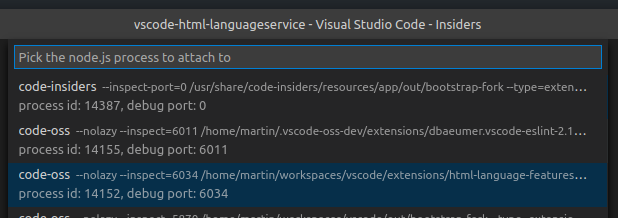
in VSCode window that is open on the vscode-html-languageservice sources, run command Debug: Attach to Node process and pick the code-oss process with the html-language-features path
set breakpoints, e.g. in htmlCompletion.ts
in the instance run from sources, invoke code completion in the .html file
License
(MIT License)
Copyright 2016-2026, Microsoft
src/languageFacts/data/webCustomData.ts (shipped as lib/esm/languageFacts/data/webCustomData.js)
are built upon content from Mozilla Developer Network and distributed under CC BY-SA 2.5.